Sell a single video
This is the simplest sale there is: one piece of content, one price. The buyer pays once and gets that video — for good if they buy it, for a set time if they rent it. No subscription, no commitment.
It is the right choice when your content stands on its own: a talk, a long tutorial, a replay, a documentary. If your videos are watched as a series, look at Sell a bundle of videos or Sell your catalogue by subscription instead.
What you need first
- Monetization active on the channel (see Activate monetization on your channel)
- The video published on the channel — media that is not on the channel cannot be sold
The two forms of one-off sale
| Purchase | Rental | |
|---|---|---|
| What the buyer gets | permanent access | access for a limited time |
| When to choose it | reference content, watched again | content watched once |
| Setting | Access period: Unlimited | Access period: Limited duration |
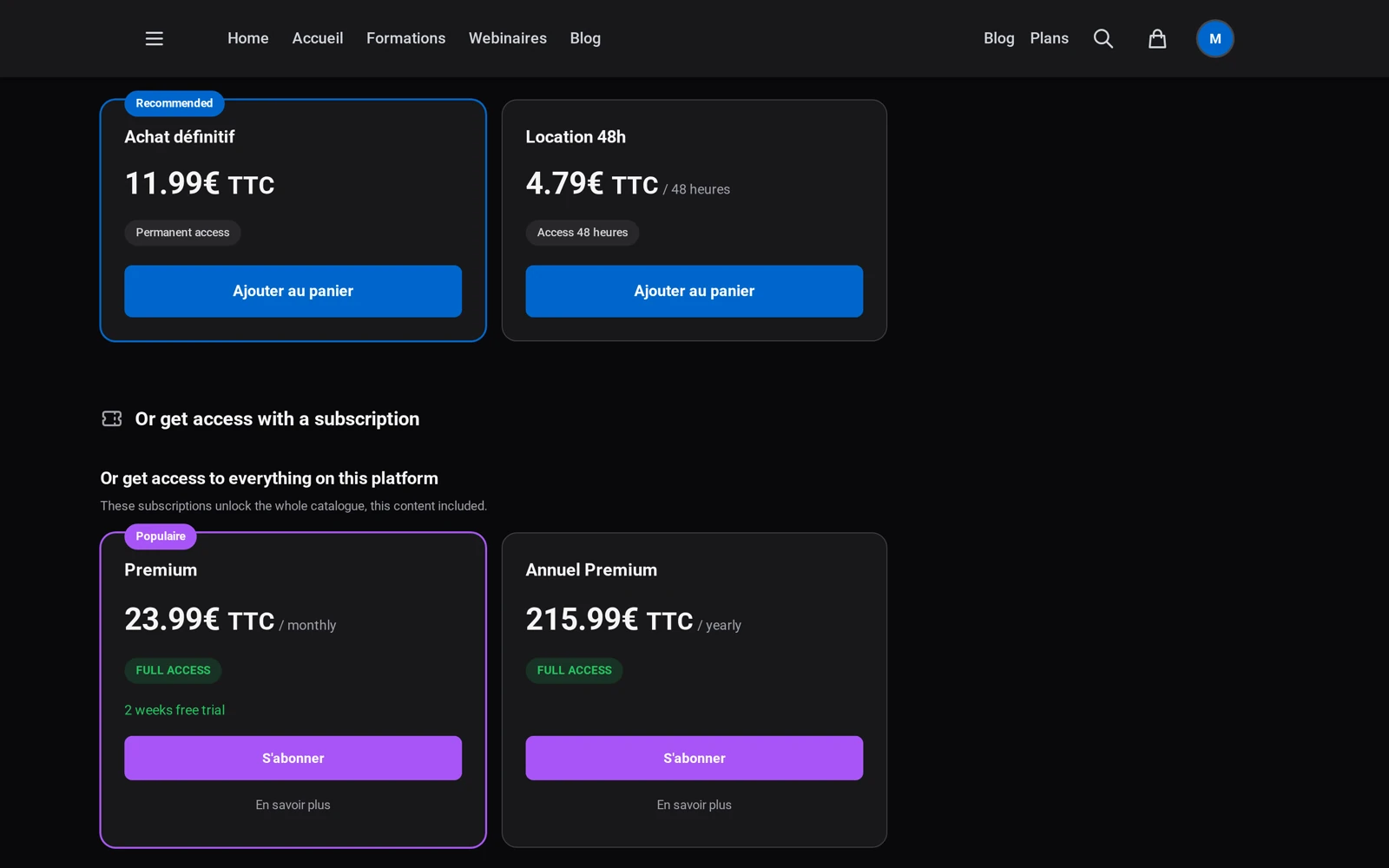
Nothing forces you to choose: the same content can carry both — a cheap rental and a pricier purchase. The buyer sees both options and decides.
Putting a video on sale
- Open the content from Content → Items on your channel
- In the Access section, choose the Paid level — a Monetization tab appears
- In the Prices section, click Add a price
- Fill in the Price excl. VAT and the Access period, then save
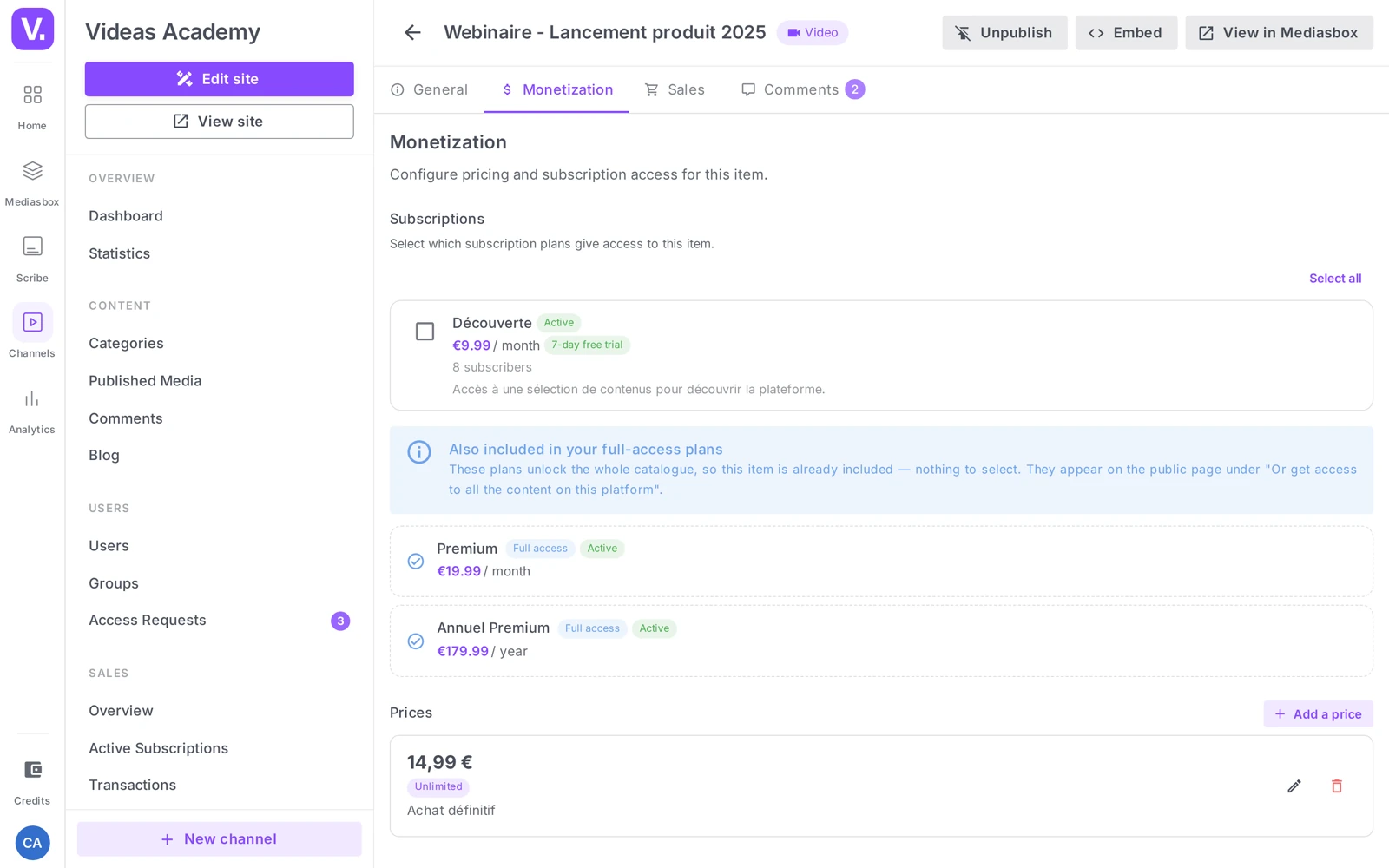
Each field — naming a price when you offer several, allowing downloads, the 1.00 minimum — is covered in Set prices for a piece of content.
VAT is added at checkout, based on the buyer’s country. The price you enter is before tax: it is what you earn, before commission.
Make people want it before making them pay
A paid video is just a locked thumbnail until the visitor knows what is inside. Two levers, on the content page:
- The trailer — a short, freely accessible excerpt that plays instead of the content for anyone who has not paid. This is the most effective lever by far.
- The description and thumbnail — what the visitor sees in the catalogue before clicking.
Tracking your sales
Every purchase shows up under Sales → Transactions, and the purchased content is added to the Access tab of the customer’s record (see Manage your subscribers and customers). Revenue is tracked under Sales → Overview, where one-time revenue is counted separately from subscription revenue.
Purchase or rental: which one?
Purchase suits reference content people come back to — a long tutorial, a conference talk, a method. Rental suits what is watched once: a replay, a documentary, an event recording.
Nothing forces you to choose. The same item can carry both prices — a low-priced rental and a more expensive purchase. The buyer sees both cards and picks, which captures the hesitant and the convinced alike.
Can I sell a video that is not on the channel?
No. An item living only in Mediasbox cannot be sold: selling goes through the channel, and the content must be published there before a price can be attached.
The second condition is active monetization on the channel, which assumes an approved activation request and a configured Stripe account.
Is the price I enter what I receive?
Almost. You enter an excluding-tax price: VAT is added at payment time according to the buyer’s country, and does not come to you.
What you actually receive is that price minus the 15% Videas commission. On a price shown at €20 excluding tax, €17 remains. The monthly statement gives the exact net.
How do I make people want to buy a locked video?
Through the trailer, by far the most effective lever. It is a short, freely accessible excerpt that plays in place of the content for anyone who has not paid — without it, a paid video is nothing but a locked thumbnail.
Two secondary levers matter earlier, before the click: the description and the thumbnail, which are all the visitor sees in the catalogue before taking an interest.
Where do I find an individual sale?
Each purchase appears in Sales → Transactions, and the content is added to the Access tab of the customer’s profile — that is where you check what someone is entitled to.
For steering, Sales → Overview counts one-off revenue separately from subscription revenue, which shows which of the two models actually carries your business.
In short
- Content at the Paid level plus a price in the Monetization tab is all it takes
- Purchase = permanent access, Rental = time-limited access; one content can carry both
- Prices are entered excluding tax; VAT is added at checkout based on the buyer’s country
- A freely accessible trailer is your best sales argument
- Sales appear under Sales → Transactions and Overview (one-time revenue)
Related articles
Screenshots were taken on Videas Academy, an example channel built for this help center. It belongs to a fictional customer, not to Videas: your own channel carries your name, your branding and your prices.