How to give free access to a subscription
To grant access to a plan without payment, there are two paths depending on the person. If they are already registered on your channel, open their profile from Users, go to the Access tab, then Gift subscription: pick the plan and the end date, and it takes effect at once. If they are not registered yet, create a 100% promo code and pass it on: they sign up and check out themselves, at €0.
The first path is reserved for the channel owner. The second works for anyone, including a stranger, and can be handed out in bulk.
Gifting a subscription to someone registered
This is the direct path — for a partner, a tester or a demo account.
- Open your channel, then Users
- Click the person to open their profile, then the Access tab
- Click Gift subscription
- Pick the subscription plan from the list
- Adjust the end date if needed — it defaults to the plan’s standard period
- Confirm with Gift subscription
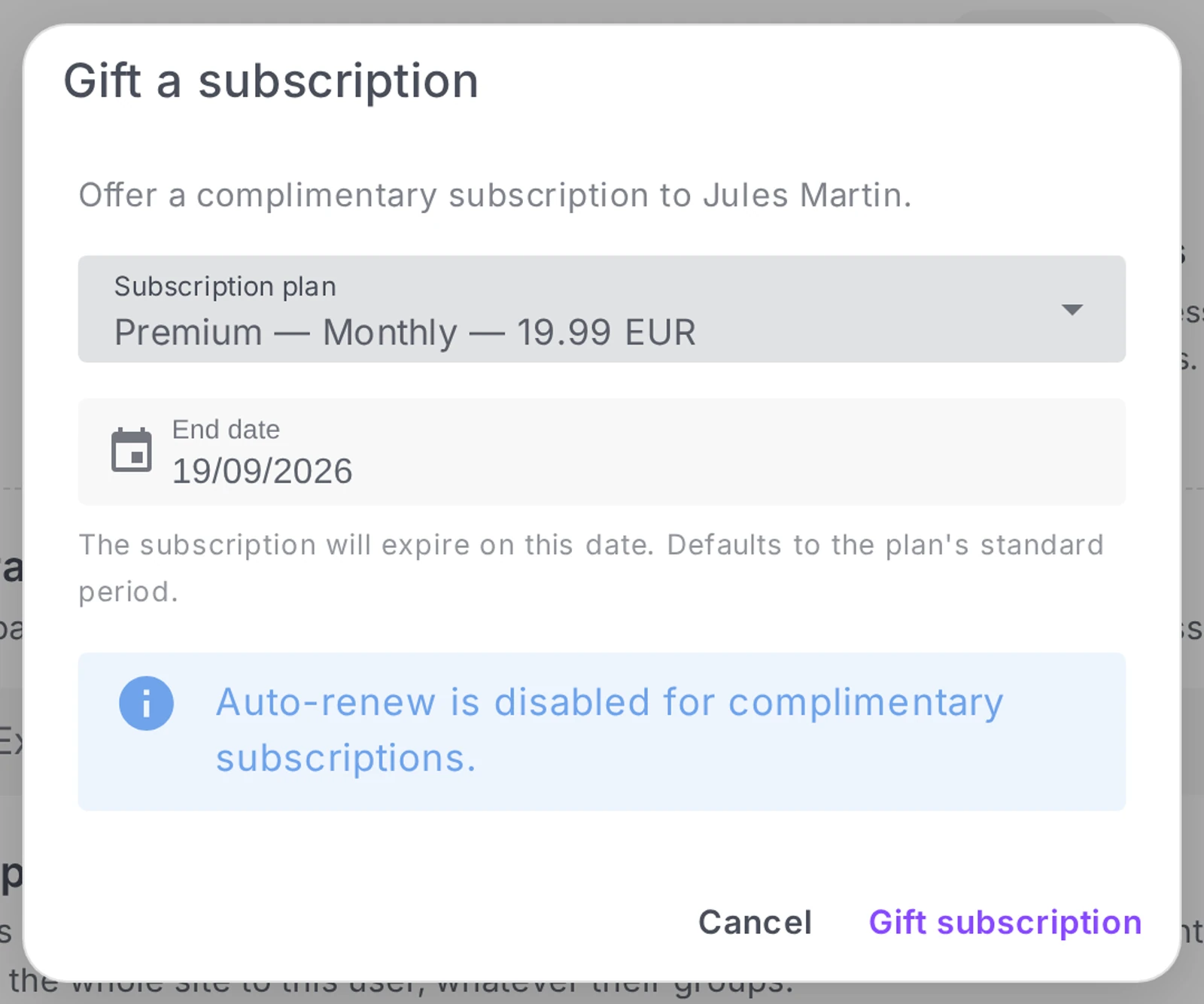
The subscription starts immediately and appears in the person’s profile like any other, flagged as complimentary.
Three conditions to know about
You must be the channel owner. An administrator or an editor who tries gets refused: “Only owners can gift a subscription.” It is a commercial gesture, and it is deliberately restricted.
The person must already be registered. The button lives in their profile: no profile, no button. For someone without an account on your channel yet, use the promo code — see below. On configuring sign-up, see Configure authentication and sign-up on your channel.
One gift per plan. If the person already has an active subscription to that plan, Videas refuses: “This user already has an active subscription to this plan.” To extend an existing access, this is not the place — do it from their profile, on the running subscription.
Auto-renew is off, and that is deliberate
A gifted subscription has auto-renew disabled. The window says so: “Auto-renew is disabled for complimentary subscriptions.”
In practice it stops on its end date, charging nothing and renewing nothing. Nobody entered a payment method, so there is nothing to charge — but it also means access drops that day, silently. If you gift a partner a year, write the date down somewhere: nothing will remind you.
For access meant to last, set a distant end date rather than counting on a renewal that will not happen.
Granting access with a 100% promo code
The other path, and the only one that works for someone who has no account yet on your channel.
Create a percentage promo code with a value of 100: the discount then covers the whole price, and the order drops to €0. The person signs up, enters the code at checkout, and comes out subscribed — without reaching for a card.
Full procedure: Create and manage promo codes.
This path brings three things a gifted subscription does not:
- It scales. One code can serve fifty people — or exactly one, if you cap the usage limit at 1.
- It asks nothing of you afterwards. The person subscribes themselves, in their own time, without you opening their profile.
- It produces an ordinary subscription. Unlike a gifted one, it follows the plan’s normal cycle.
In exchange, you control neither who uses it — a code that circulates is a code that gets forwarded — nor the end date, which is the plan’s.
Which one to pick
| Your situation | The path |
|---|---|
| A partner, already registered, whom you give a year | Gift subscription, end date one year out |
| A tester with no account yet | 100% promo code, capped at 1 use |
| A class, a cohort, a whole group | 100% promo code, usage limit set to the number of seats |
| An internal demo account | Gift subscription, distant end date |
| A dated campaign (launch, trade show) | 100% promo code, with a validity window |
| A goodwill gesture after an incident | Gift subscription, so no code goes into circulation |
What free access does not do
- It does not show up in your revenue. A gifted subscription generates no payment: it appears neither in sales nor in statements. See Track your channel sales and revenue.
- It does not renew. See above: auto-renew is disabled on gifted subscriptions.
- It does not turn into a paid subscription by itself. At expiry the person loses access and has to subscribe normally. Tell them beforehand if you want them to convert.
Frequently asked questions
Does the person get an email when I gift them a subscription?
The subscription is created in their account immediately, but tell them yourself: it is a commercial gesture, it deserves a word.
Can I grant access to a single piece of content, without a plan?
Both paths in this article are about subscription plans. For content sold individually, the 100% promo code works too — see Sell a single video.
How do I take back access I have granted?
From the person’s profile, on the running subscription — see Manage your subscribers and customers.
Can I gift several plans to the same person?
Yes: the limit applies to a given plan, not to the person. Someone can therefore hold gifted access to two different plans.
Summary
- Already registered → their profile, Access tab, Gift subscription: pick the plan and the end date
- Not registered yet → a 100% promo code they redeem themselves at checkout
- Gifting a subscription is reserved for the channel owner
- A gifted subscription has auto-renew disabled: it stops on its end date, without warning
- Videas refuses a second gift on a plan the person is already actively subscribed to
- Free access does not appear in your revenue
Why is the “Gift a subscription” button refused?
Three possible causes. You are not the channel owner — an administrator or editor gets the message “Only owners can gift a subscription”, the action being deliberately restricted. The person is not registered — the button lives on their profile, and with no profile there is no button. Or they already have an active subscription to that plan, which Videas explicitly refuses.
In the second case, the answer is a 100% promo code. In the third, what you need is not a new subscription but an extension, made on the running subscription from its profile.
Does a gifted subscription renew?
No, never: auto-renewal is disabled on gifted subscriptions, and the window says so at creation time. Nobody entered a payment method, so there is nothing to charge.
The consequence is worth noting: access ends on the end date, silently, with nothing to warn you. If you gift a year to a partner, write the date down somewhere. And for access meant to last, set a distant end date rather than counting on a renewal that will not happen.
How do I gift access to someone with no account?
Through a 100% promo code. It is the only route that works: the person signs up, enters the code at payment, and comes away subscribed without producing a card.
That route brings three things a gifted subscription does not. It distributes — one code can serve fifty people, or one if you set the limit to 1. It asks nothing of you afterwards: the person subscribes at their own pace. And it produces an ordinary subscription, following the plan’s normal cycle.
Does gifted access appear in my revenue?
No. A gifted subscription generates no payment: it appears neither in sales nor in the monthly statements.
Logical, but disconcerting when counting subscribers: the number of active accesses and the revenue figure do not line up. A 100% promo code, by contrast, does produce a transaction — at €0.
Does gifted access turn into a paid subscription at the end?
No. On the end date, the person simply loses access and has to subscribe normally to continue. There is no automatic switch and no reminder sent by Videas.
If you are counting on conversion, tell the person before the deadline: it is the only thing that will trigger it.
How do I choose between the two routes?
By what you want to control. Gift a subscription when you are targeting one specific person, already registered, and want to control the end date — a partner, a demonstration account, a goodwill gesture after an incident.
100% promo code when the target is a group, when the person has no account yet, or when the operation is time-bound — a whole class, a trade show, a launch. In exchange, you control neither who uses it, a circulating code being a code that gets forwarded, nor the end date, which is the plan’s.
Related articles
Screenshots were taken on Videas Academy, an example channel built for this help center. It belongs to a fictional customer, not to Videas: your own channel carries your name, your branding and your prices.