Promote a paid video on your own website
Not all your buyers are on your channel. The Embed button, on a channel item, gives you a code to paste on any website — your corporate site, a blog post, a partner page. The player shows up there, and paid content displays its entry price — or its trailer — instead of playing.
It is a shop window placed elsewhere: playback stays with you, so does the purchase, but discovery happens where your visitors already are.
What this player does, and does not
A visitor arriving through an embedded player is always anonymous inside the iframe. So the player never unlocks paid content in place: it shows enough to create the urge, then links back to the item page on your channel, where the visitor signs in and buys.
| The content is… | What the visitor sees |
|---|---|
| Public | the video, playing normally |
| Paid, without a trailer | a locked card: the title, the access modes, a From X € badge and a View on your channel button |
| Paid, with a trailer | the trailer, playing in place — the price appears on the end card once the excerpt finishes |
| Restricted | a neutral card linking back to the item page |
“From” appears as soon as there is more than one way in — a purchase and a rental, or a purchase and a subscription. The amount shown is the lower of the two, subscriptions included: it is the entry price, not the price of the content.
This is not the Mediasbox embed. That one distributes a media file and ignores selling (see Embed a video on your website). The channel player carries the item’s access rules — so its price, its subscriptions and its trailer.
What you need first
The Embed button is always there, but it refuses to produce a code until two conditions are met. The dialog tells you which one is missing:
- Your channel needs a domain. The code points at your domain, not at Videas. Until the channel is published, the message reads “This channel does not have a domain yet” (see Connect a custom domain).
- The content must allow embedding. On its page, the Allow embedding option — “This content can be embedded on other sites” — is on by default. Switch it off for content you do not want appearing anywhere else.
Getting the code
- On your channel, open the item from Content → Items
- Click Embed in the top bar
- Adjust the appearance, then Copy code
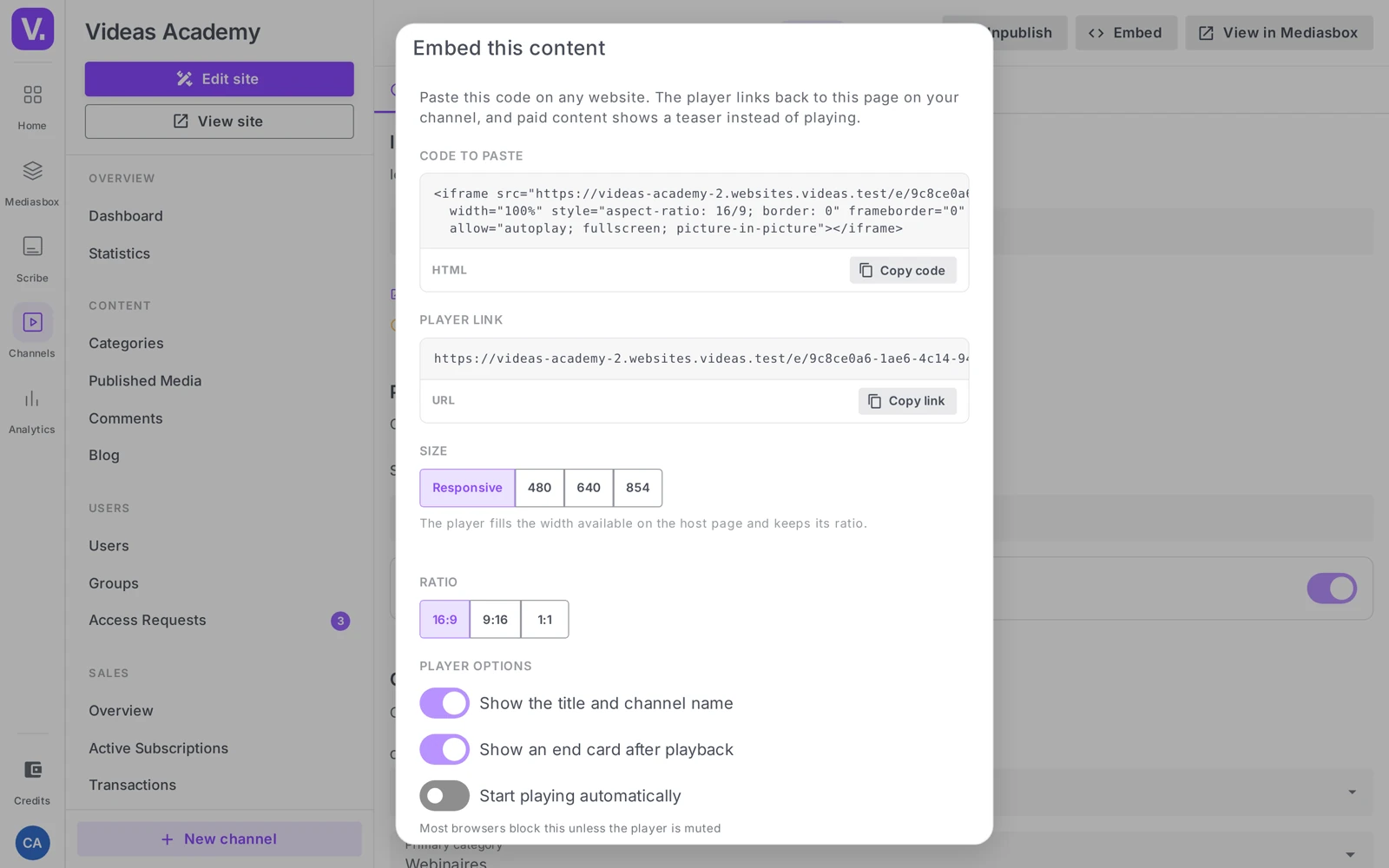
The available settings:
| Setting | Effect |
|---|---|
| Size | Responsive (the player takes the available width) or a fixed width in pixels |
| Ratio | the aspect ratio, irrelevant for audio — an audio player is a fixed-height strip |
| Show the title and channel name | the title bar above the player |
| Show an end card after playback | the reminder screen once the video ends |
| Start playback automatically | most browsers block it unless the player is muted |
The dialog also gives a Player link, to use as-is when the host platform prefers a URL to an HTML block.
What the visitor sees
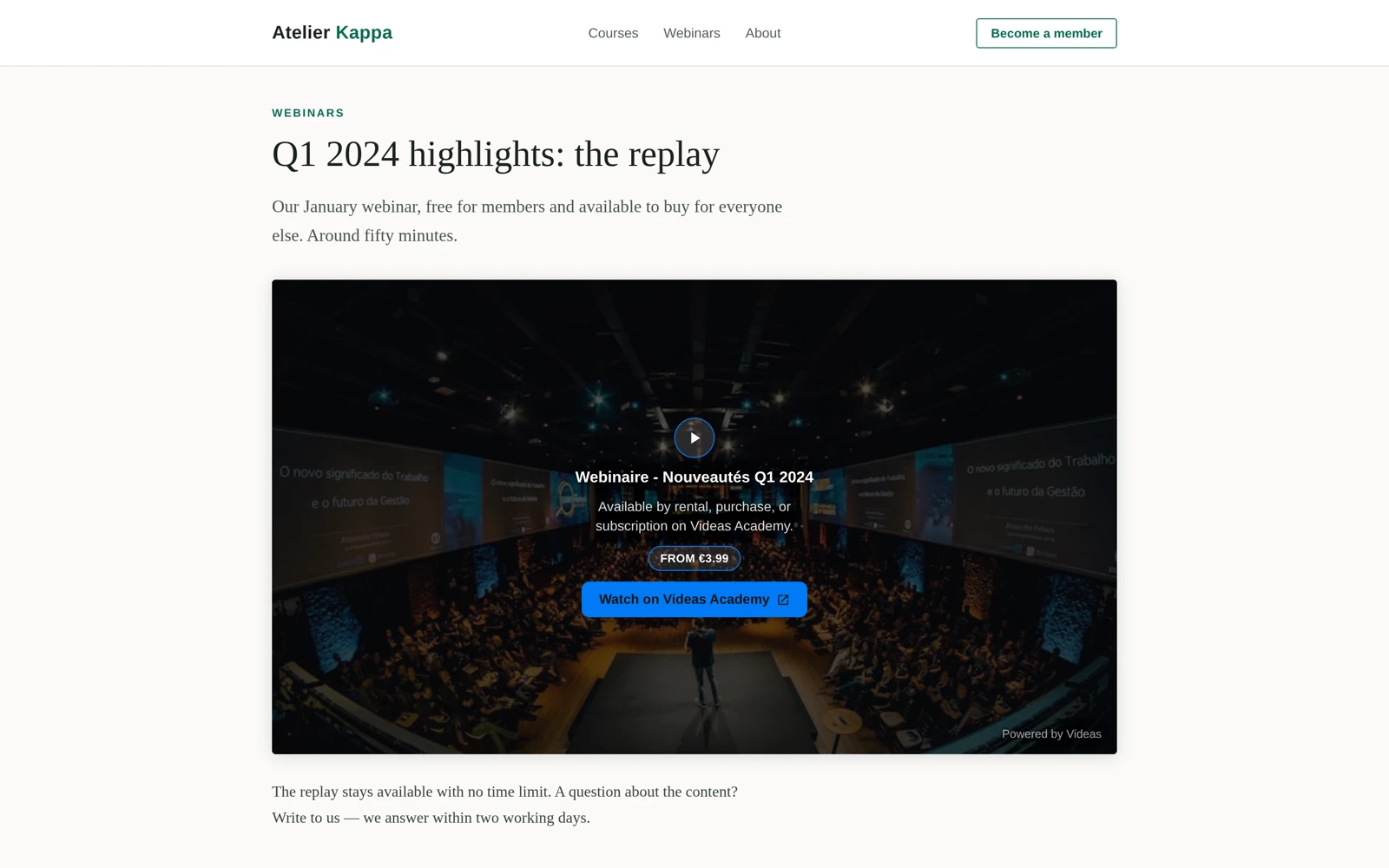
Both states are valid, and the choice is yours: without a trailer, the visitor sees the price straight away; with one, they watch first and see the price at the end. The second converts better when the excerpt is good, the first when the title speaks for itself (see Sell a single video).
A published code never breaks. If you unpublish the item, change its access level or switch embedding off, the player already pasted on someone else’s page falls back to a neutral card. It returns no error and shows no broken page on your partner’s site.
Can the visitor buy directly in the embedded player?
No. A visitor in an embedded player is always anonymous inside the iframe: nothing unlocks there. The player shows what is needed to create desire — an entry price, or the trailer — then sends them to the content’s page on your channel, where they sign in and buy.
It is a remote shop window: discovery happens where your visitors are, playback and purchase stay with you.
What does the “From €X” badge mean?
That there are several ways in — a purchase and a rental, or a purchase and a subscription. The amount shown is the lower of the two, subscription included.
So it is an entry price, not the content’s price. A visitor who sees From €4.90 may find on the page that outright purchase costs €19 and that €4.90 is a monthly subscription.
Should embedded content have a trailer?
Both states are defensible. Without a trailer, the visitor immediately sees a locked card with the title, the access options and the price: direct, effective when the title speaks for itself. With one, they watch the excerpt first, which plays in place, and the price only appears on the end card.
The second converts better when the excerpt is good. The first, when the content sells on its subject.
Why doesn’t the Embed button produce a code?
Because one of the two conditions is missing, and the window tells you which. Either your channel has no domain yet — the code points to your domain, not to Videas, and the message reads “This channel does not have a domain yet”. Or the content does not allow embedding: the option “This content can be embedded on other sites”, on by default on its page, has been switched off.
How does this differ from embedding from Mediasbox?
They do not carry the same thing. Mediasbox embedding delivers a media item and ignores selling entirely: the player plays the file, with no notion of price or subscription.
The channel player carries the content’s access rules — its price, its subscriptions, its trailer. That is what makes it a commercial shop window rather than a plain player, and the reason to go through the channel when the content is paid.
What happens to a pasted code if I unpublish the content?
It falls back to a neutral card. Whether you unpublish the content, change its access level or withdraw the embedding permission, the player already in place on a third-party site shows neither an error nor a broken page.
That is what lets you circulate codes among partners without fearing you will break their pages every time something changes on your side.
In short
- The Embed button on a channel item produces a code to paste on any website
- Paid content shows a From X € card with its access modes — or its trailer, the price then arriving on the end card
- “From” signals more than one way in, and shows the cheapest, subscriptions included
- A visitor on an embedded player is always anonymous: nothing unlocks inside the iframe
- Two conditions: the channel needs a domain, the content must allow embedding
- Not to be confused with the Mediasbox embed, which distributes a media file without the sales rules
- A published code falls back to a neutral card if the content changes state
Related articles
Screenshots were taken on Videas Academy, an example channel built for this help center. It belongs to a fictional customer, not to Videas: your own channel carries your name, your branding and your prices.