Conference organiser
Sell your conference recordings all year round
Recorded talks become a catalogue that keeps selling all year.
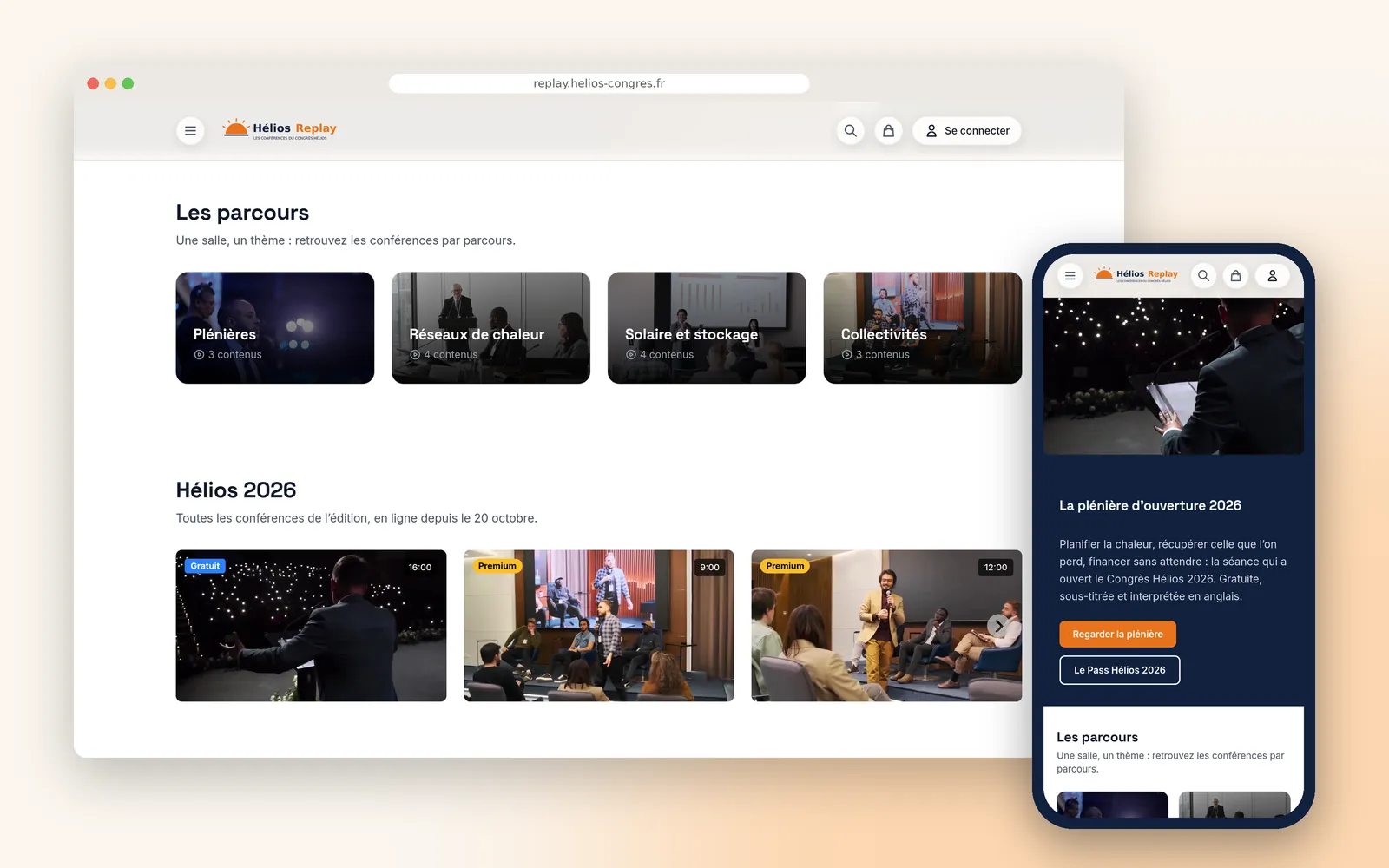











To sell conference recordings, Videas files the talks on a channel at the event's address, by edition and by track. Each talk sells outright, as a rental or through an edition pass paid once for a set period, while attendees join a group that opens their edition without paying. Paid talks stay visible, locked, with their title and summary.
“Ardéa Events” runs the “Hélios Congress”, the annual meeting of energy professionals, invented for this walkthrough: three days, two thousand attendees, around forty talks. Claire Vasseur directs the congress, Romain Delage runs the programme, Inès Moulin communications.
After the event recording, a channel of your own
A crew films the four rooms and hands over forty files. Then nothing: they sleep on a drive, or go online for free, and the congress really does end on the third day.
Yet the material is there: forty expert talks, their slides, a recorded interpretation, and attendees who could not be in four rooms at once.
Every talk singly, as a rental or in a pass
Everything is filed on a channel at the congress’s address, by edition and by track. A talk is bought with permanent access, rented for three days, or opened by the edition pass, paid once for twelve months. The plenaries stay free.
A paid talk stays visible, locked, with its speakers and its summary. On the site’s programme page it embeds exactly as it is, entry price included: payment happens on the channel, but the shop window is where people read the programme.
Attendees watch everything, without paying
The post-event email carries a sign-up link: whoever uses it joins their edition’s group, and that group opens the whole category, talks edited late included. It expires on a date you choose, after which it opens nothing. Nothing to import from a ticketing system.
The plenaries carry the interpreting booth’s voice as a second audio track, and the other talks their subtitles, proofread, in French and English through Scribe. Under each video, the speakers’ slides.
The plenary on the event site, with its sponsor
Plenaries embed on the congress website from the media library, and that is where the sponsor’s advert runs, from the address their ad server provides. Never on the channel’s pages: the sponsor is paying for one precise slot.
Then the attendees need telling. The email leaves the channel for the attendee group, and the statistics say afterwards which talks were watched, and so which rooms to film next year.
How it works, step by step
The replay channel
At the congress's address and in its colours. Talks filed both by edition and by track, which means by room, and badges that say what is open and what is sold.
A talk for sale
Three doors onto the same video: the outright purchase, the three-day rental for someone who just wants to see it, and the pass for someone who wants ten.
Locked, not hidden
The title, the speakers and the summary stay readable. A talk nobody can see does not sell; this one can be judged before it is paid for.
The edition pass
A plan that opens only this year's talks. Next year will have its own, and last year's keeps selling.
One payment, twelve months
Paid once, valid a year: this is a congress pass, not a subscription that renews itself. Prices are entered including tax.
The attendee group
Whoever was in the room watches their edition without paying. The group carries an end date, after which it opens nothing.
What the group opens
A whole category, including talks added to it later. A session edited late does not mean redoing anyone's access.
The sign-up link
Dropped into the post-event email, it sorts everyone who uses it into the group. No ticketing list to import, no file to copy.
A talk playing
One chapter per speaker, to go straight to the right one, and the slide decks underneath. On a paid talk they only show to people with access.
The English audio track
This is the interpreting booth's voice, not a machine. The viewer picks it in the player, the way they would pick a subtitle.
The audio tracks
The interpreter's recording is added as another track of the same video, provided it has the same length. One page, two audiences.
The advertising settings
The VAST address the organiser's ad server provides. Videas does not host that advert and does not sell it: the campaign's figures live with the ad server.
The sponsor before the plenary
The advert runs on videos embedded in the congress site, never on the channel's own pages. The sponsor is paying for visibility that actually exists.
The allowed domains
The player only starts on the congress site. Copied elsewhere it stays black: the free plenary does not become somebody else's content.
The sales player
On the programme page, the paid talk shows its title, its ways in and its entry price. Payment happens on the channel: you do not buy inside an embedded player.
The email to attendees
The message that turns a finished congress into an open catalogue, with a handful of talks brought forward rather than a link to everything.
Who it goes to
The edition's attendee group, and them alone. Anyone who unsubscribed does not receive it.
What was watched
Which talks, which tracks, for how long. This is what says which rooms to film next year, and which were not worth the camera.
What our customers say about us
Videas enabled us to create a genuine connection between our French and Canadian teams. The platform has become the go-to hub for our internal communications: every employee can access content in their language, react, and get involved, wherever they are.
The Videas Web TV has become a must-attend event for our teams. The weekly live streams with the CEO have transformed our internal communications: employees ask questions live, react, and get involved. We've gone from one-way communication to a genuine dialogue.
Your solution is top quality, your team is responsive and attentive, and the results amply exceed our expectations. We hope to work with you for a long time to come, as you contribute to our success.

Videas provides exactly what we needed: uncompromising security for our premium content, native GDPR compliance, and an integration simplicity that saves our educational teams valuable time.
Videas enabled us to structure our video communications at the national level while giving each region the tools to operate independently. GDPR compliance and accessibility were non-negotiable prerequisites, and Videas delivers them natively.
Videas enabled us to centralize the management of thousands of educational videos while simplifying interactions with our partners. The ONISEP TV platform has become an essential tool for distributing our content to millions of students and families.
Frequently asked questions
What do you do with the videos after recording an event?
File them on a channel at the event's address, by edition and by track, and decide talk by talk what is free and what is sold. Videas does not film: your recording crew hands over the files, and that is where their second life begins.
Can you sell a recorded talk on its own?
Yes, as an outright purchase with permanent access, or as a rental for a period you set, in hours or days. Prices are entered including tax, from 2 € up. A paid talk stays visible, locked, with its title and summary: it works as its own shop window.
How do you offer a pass to a whole edition's talks?
Through a plan that opens only a selection of content, paid once for a given duration: twelve months of access to the edition, for instance. That is an edition pass, not a subscription that renews.
How do attendees get free access?
Through a group: they sign up via a link you drop into your post-event email, the link sorts them into the group, and the group opens their edition's category. The group carries an end date, after which it opens nothing. There is no import from a ticketing tool.
Can a talk be offered in more than one language?
By adding the interpreter's booth recording as a second audio track, which the viewer picks in the player. The file must be the same length as the video. There is no automatic interpreting and no AI dubbing: it is your interpreter's voice.
How do you put the speakers' slides under the video?
By attaching the PDF to the talk: made public, it appears under the video in Attachments, ready to download. On a paid talk it only shows to people who have access to that talk.
Can you run your sponsor's advert before a talk?
Before videos embedded on your own site from the media library, using your ad server's VAST address, with the domains you exclude. Not on the channel's own pages, and not on a share link. Videas neither hosts nor sells that advert: its figures live with your ad server.
Can a paid talk be embedded on the event's website?
Yes, with the channel's embed code. The talk stays locked there, with its title, its ways in and its entry price; the button sends the visitor to its page on the channel, where payment happens. You do not buy inside an embedded player.
How do you tell attendees the replays are online?
Through a campaign sent from the channel to the attendee group, with a selection of talks, straight away or scheduled. Anyone who unsubscribed does not receive it.
What can you learn about what was watched?
The most-watched talks, the most-viewed categories, watch time, countries, devices and traffic sources, exportable to a spreadsheet. The channel's sales list sits separately. Enough to decide which rooms to film next year.
Going further
More scenarios
All scenarios →Private companies
Take your local TV station online, on a channel of its own
The live stream, the shows on replay and fifteen years of archive together.
Private companies
Run a shared video library across your whole network
A workspace per location, a shared library head office moderates.
Public institutions
Make a video accessible to every one of your viewers
Captions, transcript, chapters, audio description and keyboard control.