B2B marketing
Run your webinars without copying a list again
Sign-ups, invitations, the live session and the replay in one place.











To run your webinars in one place, Videas puts sign-up, invitations, the live session and the replay on one channel at your own address. One registration covers every session, campaigns leave from the channel, you broadcast to Videas Stream from OBS or any RTMP encoder, and the recording files itself as a replay. There is no live subtitling.
“Kerlis” is a payroll software company for small businesses and accounting firms, invented for this walkthrough. Margaux Perrin runs marketing, Antoine Delmas presents, Salomé Benali answers the questions.
One webinar a month, four tools that ignore each other
A video-conferencing tool for the session, a form for sign-ups, an emailing tool for the follow-ups, a consumer video platform for the replays. Between each one, a list somebody copies across.
And next month it starts again: new form, new list, and registrants giving their role and their company for the third time.
A webinar platform where everything sits together
Visitors sign up once, to the channel: name, email, then the questions the team chose, role and company size among them. That registration covers every session to come and every replay.
Invitations and reminders leave from the channel itself, toward people already on it. Nothing to export from one tool and import into another, and no list drifting out of step between the two.
On the day, Margaux directs in her usual software and sends the feed to Videas. The studio shows the preview, she goes live with one click, Salomé answers in the chat. The audience is on a web page: nothing to install, nothing to allow.
The replay, where a webinar finds its real audience
When the broadcast ends the recording is already filed, and it publishes into its category. Margaux adds the chapters and the slides, then asks Scribe for subtitles, for the people who will watch at their desk with the sound off.
And that is where the work pays off: a webinar lives forty-five minutes, its replay works all year. The statistics keep the two apart, the live peak on one side, the replay completion rate on the other. You finally know which of the two audiences you are serving.
How it works, step by step
The webinar channel
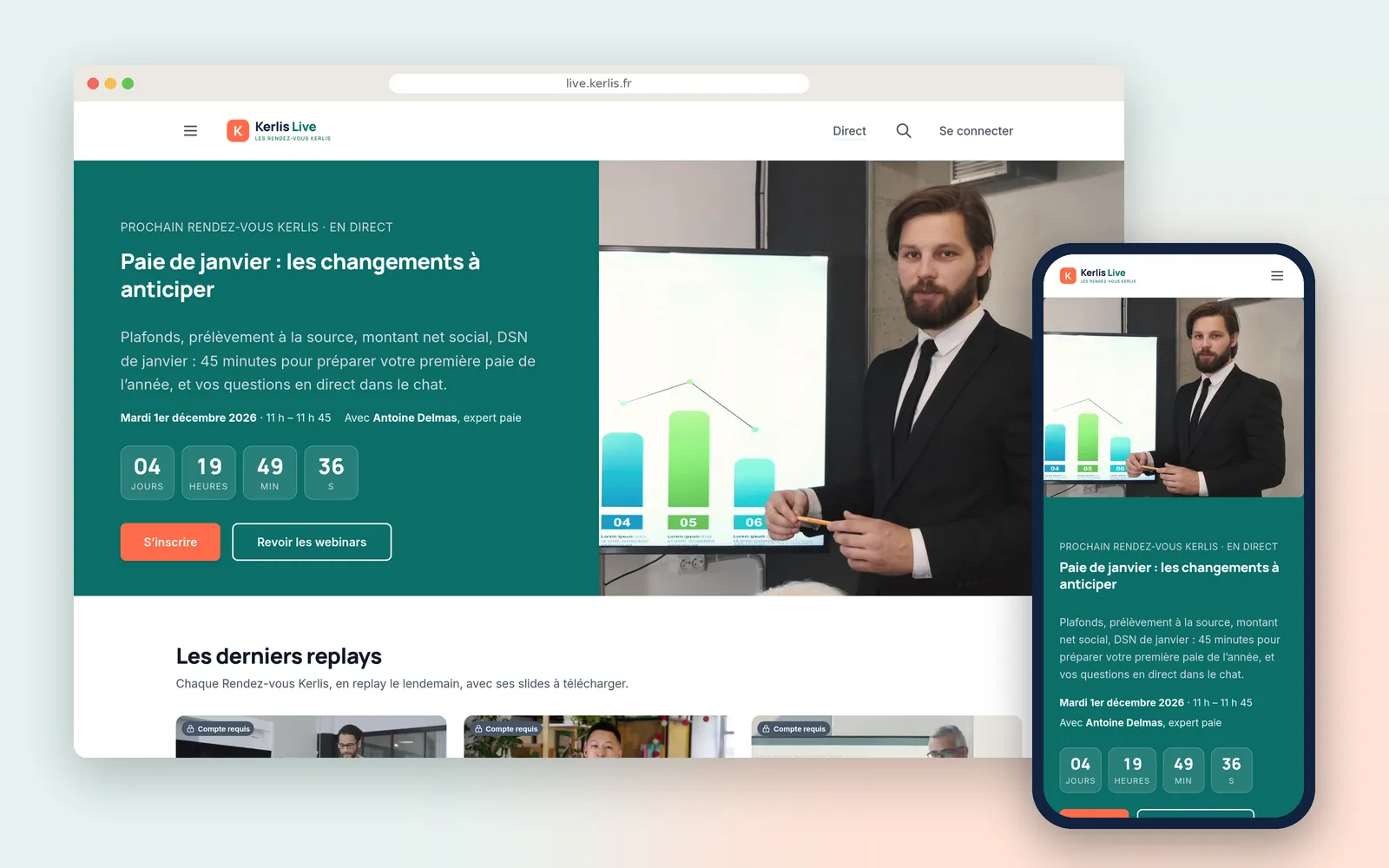
At the company's own address and in its colours: the next session up top with its countdown, and the replays sorted by theme underneath. One place to promote, and everything else leads there.
Registration
Name and email, then the questions Margaux chose: role, company size, customer or not. You sign up once, and it holds for every webinar to come.
A registrant's record
The answers stay attached to the person, and sales knows who it is talking to before picking up the phone. Customers arrive through an invitation link that sorts them into their group.
Invitations and reminders
The invitation ten days out, the reminder scheduled for 5pm the day before, and the replay email already written. All three leave from the channel, toward people already on it: no list to copy.
The send
Delivered, filtered, failed, unsubscribed. Next month's campaign duplicates from this one rather than being rewritten.
The schedule
One appointment a month, set in advance, with past sessions and their replays alongside. The stream key never changes, so OBS is configured once and left alone.
The studio
Encoder connected, a preview before air, and a list of what has to be true before clicking. Margaux sees what the room will see, then goes live.
Before the session
A countdown and « Add to my calendar »: whoever turns up early knows they are in the right place, and whoever finds the page today puts it in their diary.
Live
Antoine presents from the meeting room, Margaux directs in OBS, Salomé answers in the chat. The viewer installed nothing: they are on a web page.
The replay
Filed by itself, published into its category. Margaux adds chapters and the slides: what was an appointment becomes a page that works all year.
The comments
Questions do not stop when the stream does. The ones that arrive later are asked under the replay, and the expert's answer carries the channel's badge.
The live audience
The peak, the minute-by-minute curve and the average time spent. The curve says when the room left, which no impression of the session ever does.
The replay audience
This is often where a webinar finds its real public, weeks later. Plays, visitors, time spent, completion rate, and the export for the quarterly review.
The subtitles
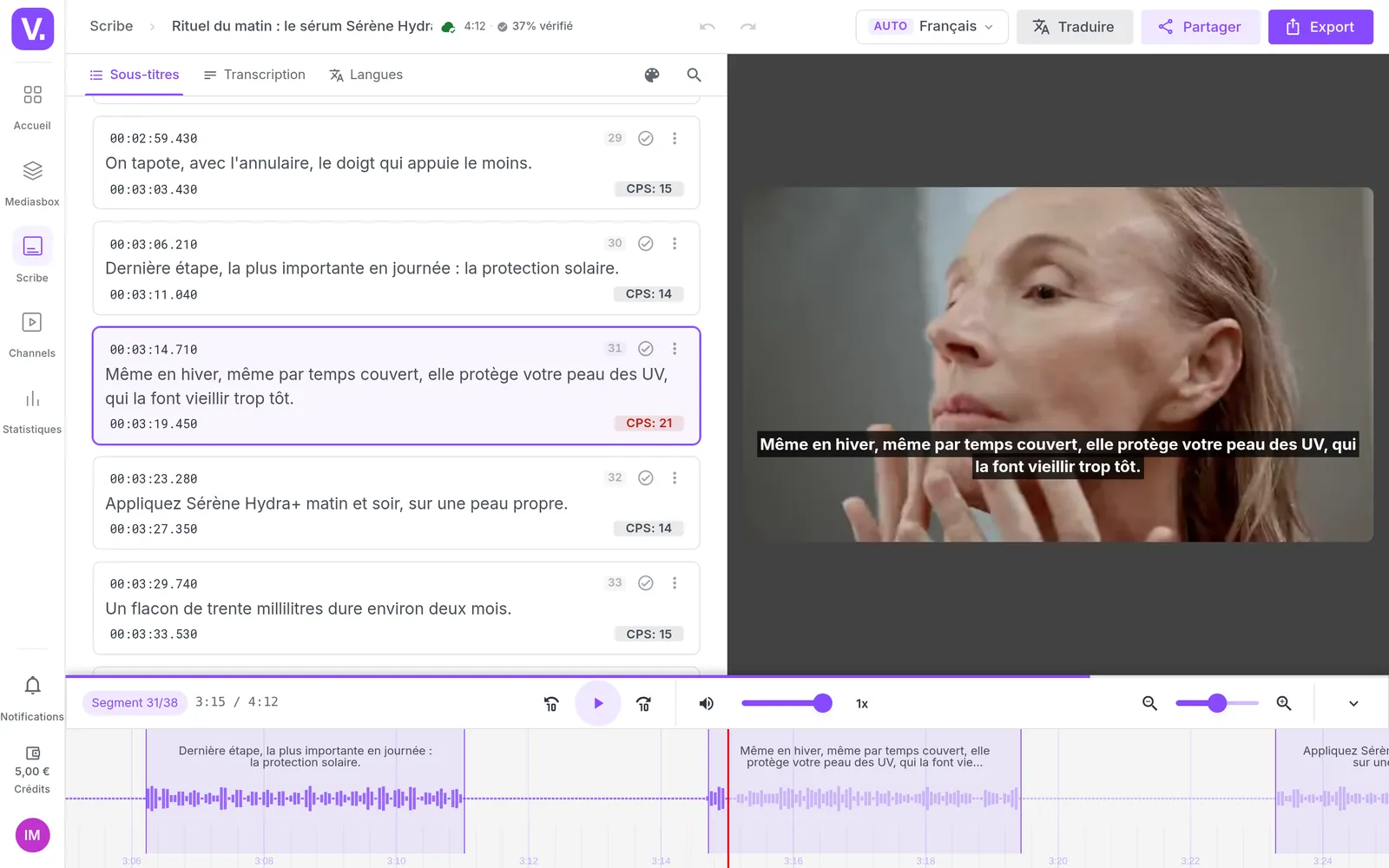
Scribe transcribes the replay, Margaux proofreads. The glossary holds the trade's vocabulary, the words no machine guesses and everyone in the field spells the same way.
The subtitled replay
Watchable at a desk with the sound off, in an open-plan office, over a lunch break. Part of any webinar audience is exactly that.
What our customers say about us
Videas enabled us to create a genuine connection between our French and Canadian teams. The platform has become the go-to hub for our internal communications: every employee can access content in their language, react, and get involved, wherever they are.
The Videas Web TV has become a must-attend event for our teams. The weekly live streams with the CEO have transformed our internal communications: employees ask questions live, react, and get involved. We've gone from one-way communication to a genuine dialogue.
Your solution is top quality, your team is responsive and attentive, and the results amply exceed our expectations. We hope to work with you for a long time to come, as you contribute to our success.

Frequently asked questions
What webinar platform suits a software company?
A Videas channel at your own address and in your own colours, where registration, invitations, the live session and the replays sit together. You broadcast from OBS or any RTMP encoder: the production stays yours, the distribution and the archive are ours.
How do people register for a webinar?
Through a sign-up page for the channel, with whatever questions you choose beyond name and email: company, role, headcount, customer or not. One registration covers the whole channel, so it covers every webinar and every replay. Nobody signs up again each month.
Can invitations and reminders go out from the platform?
Yes, from the channel itself: you write the campaign, pick an audience, send yourself a test, then schedule the date and time. Next month's duplicates from this one. There is no reminder that fires automatically against a webinar's date: you schedule them.
How do you broadcast a webinar live?
From OBS or any RTMP encoder, to a permanent stream key that does not change between webinars. The studio shows the preview before you are on air, you go live with one click and end with another. Expect around ten seconds between the room and the viewer's screen.
Can the audience ask questions during the session?
Through the chat beside the player, where someone on your team answers live. There are no polls, no upvoted Q&A and no attendee speaking: the room listens and types, it does not appear on camera.
Is the replay available as soon as the live ends?
Recording starts the moment your encoder connects, and the replay lands by itself in the folder you chose, then publishes into the category you set. It is not online the second the stream stops: you keep the time to add chapters and slides.
Can some replays be reserved for customers?
Yes, through groups: an invitation link of its own sorts whoever uses it into a group, and a category of replays opens to the group you choose. The live page itself is set for the whole channel, either open to all or reserved for registrants.
How many people can watch a webinar live?
Delivery scales with your audience; talk to the Videas team if you expect an unusual turnout. An organisation broadcasts one live stream at a time by default, and two simultaneous webinars are arranged in advance.
What do webinar statistics tell you?
For the live session, the peak of concurrent viewers, the curve through the broadcast and the average time watched. For replays, plays, unique visitors, watch time and completion rate, exportable to a spreadsheet. You will not learn, registrant by registrant, who attended live.
Can a webinar replay be subtitled?
Yes: you ask Scribe for them after the session, your team proofreads with a glossary of your own terms, and the subtitles appear in the player. That is what makes a replay watchable at a desk with the sound off. There is no live subtitling.
Going further
More scenarios
All scenarios →Studios & production companies
Have your client approve the subtitles, line by line
The client reviews the subtitles line by line from a link, and the agency decides.
Private companies
Gather internal communications onto one video portal
One place where 1,800 employees find what the company has to tell them.
Private companies
Publish video tutorials your software's users can find
An academy open to all, filed by what the customer is trying to do.