Newsroom
Turn your interviews into text without replaying them
One transcript, corrected once, serves the article, the subtitles and the public.











Who it is for
You replay your filmed interviews to find one quote.
What it settles
- Proper nouns right the first time
- Text exported to write, subtitles for the edit
- A transcript the public reads and searches
Products used
To turn a filmed interview into text you can quote from, Videas Scribe transcribes its audio to text, a shared glossary fixes the spelling of names, and speaker detection, once switched on, names each voice. The corrected text exports as TXT for the article or SRT for the clips, and the public reads and searches it beside the player.
“Marnelle Média” is an online outlet covering the environment, invented for this walkthrough. Élise Dumontet runs the newsroom, Karim Belhadj conducts one filmed interview a month, Léa Fournial cuts the clips.
An hour of interview replayed three times for one quote
Karim reopens the file, scrubs forward, scrubs back, finds the sentence, retypes it. Three times an interview. The guests’ names and the acronyms end up misspelled in his notes, and nobody notices before publication.
And the interview conducted in English has never been offered in French: it would have meant transcribing the whole thing by hand.
A transcript corrected once, for three uses
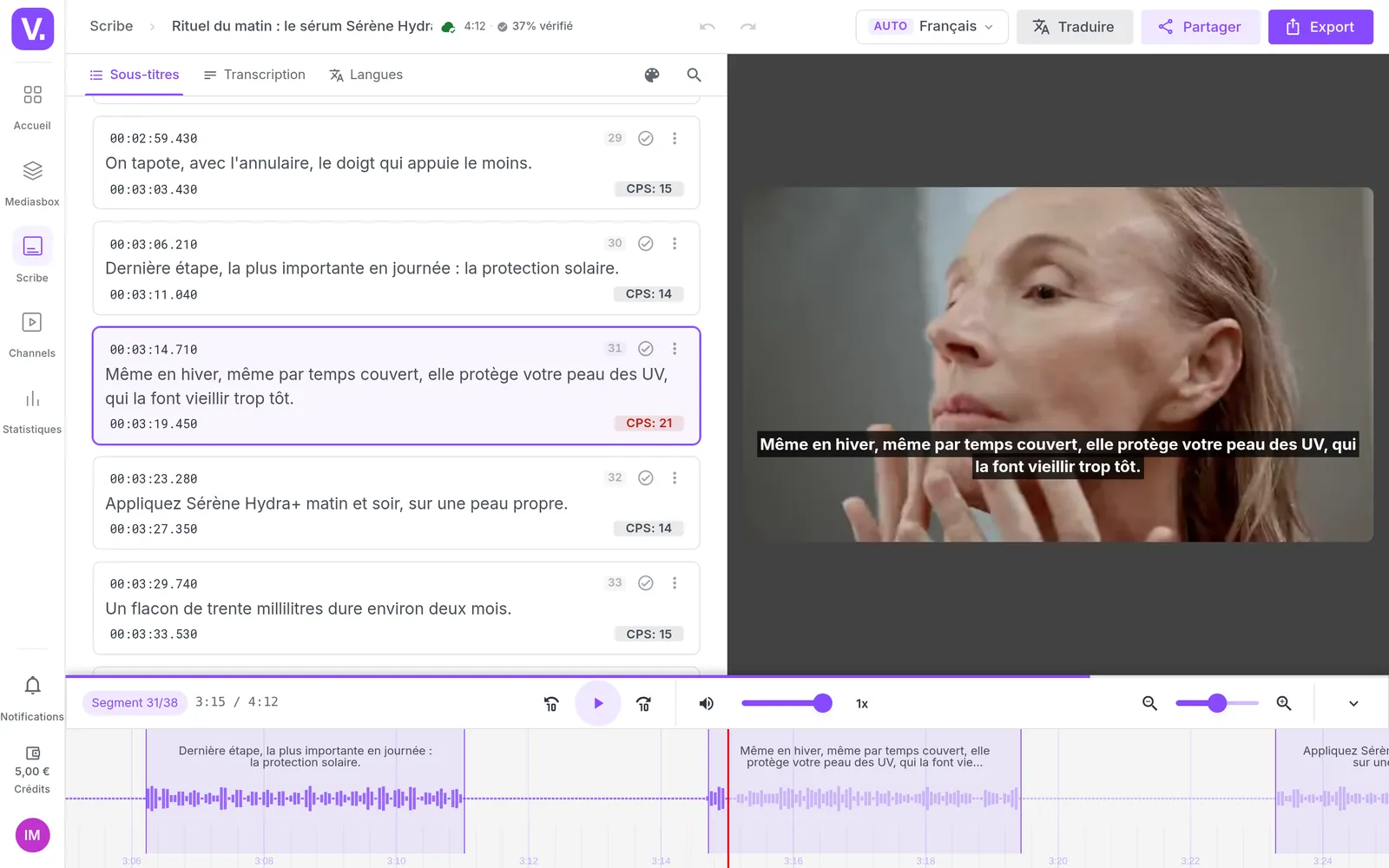
Scribe transcribes the interview, and the newsroom’s glossary fixes the spelling of names and of the subject’s vocabulary throughout. Karim then works in the editor, listening: a misheard term is replaced at once, and proofread lines are marked.
Speaker detection separates the interviewer from the guest; each voice is named once, and every line then carries its name. Then the text comes out: TXT to write the article, SRT to cut the clips. One piece of correction work, two trades served.
The English interview gains a French track at the same per-minute rate. A foreign guest stops being an interview you do not publish.
An episode the public reads, searches and downloads
On the site, the transcript opens in a panel beside the player. You see who is speaking, you search a word and the results highlight, a click takes the video there, the text follows the playback, the chapters act as subheadings, and it downloads.
That is the third use of the same work, and the least obvious: an hour-long interview becomes something you skim. On a phone, the panel takes the place of the image, search included.
How it works, step by step
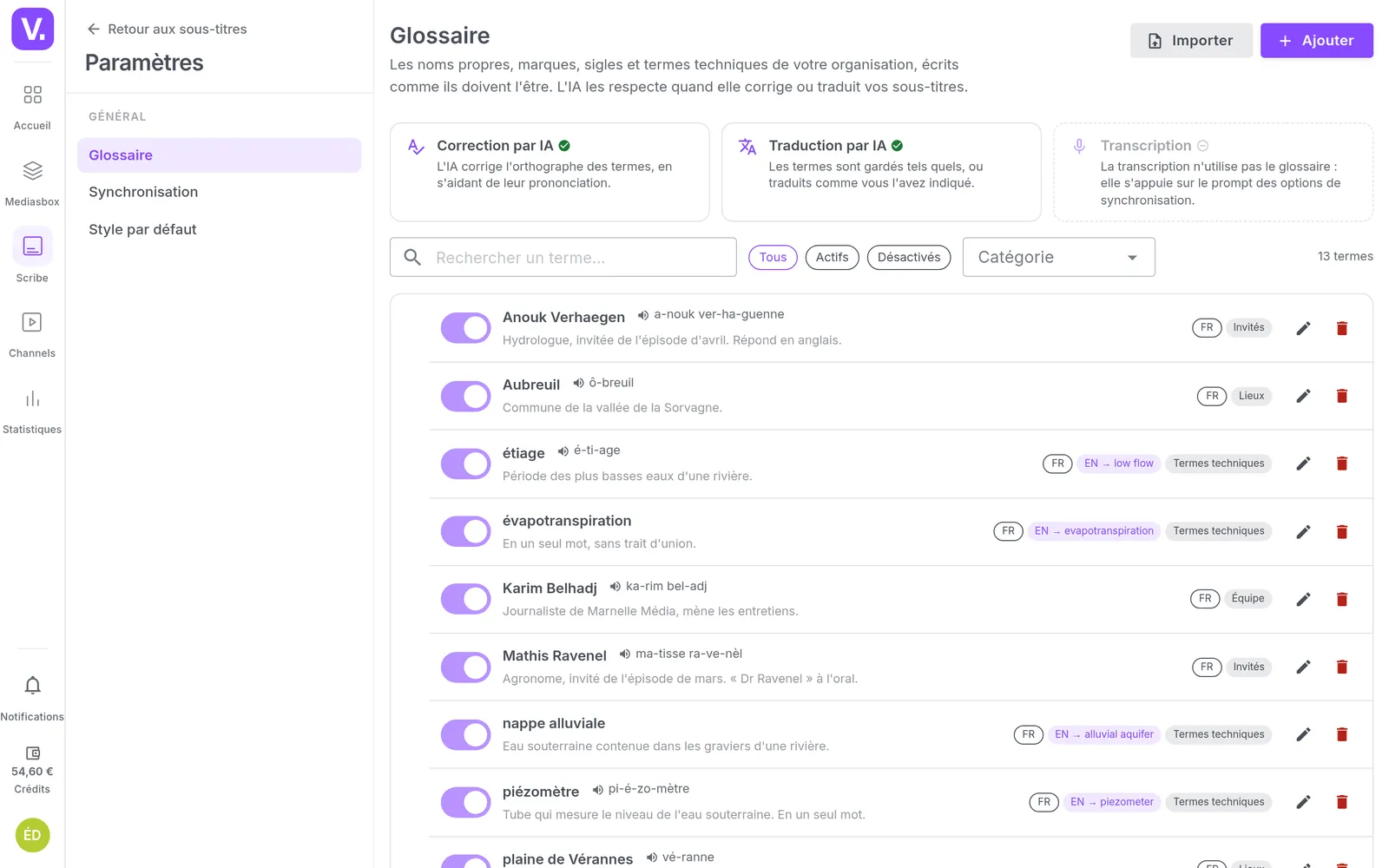
The glossary of names
Filled in once for the whole newsroom: the guests, the places, the acronyms, the subject's vocabulary. It is what fixes a name's spelling across a whole transcript, rather than thirty corrections by hand.
Launching the transcription
You launch it when you decide, not when the file lands, and the cost shows first: 0.10 € per started minute, per language produced. A rush does not need transcribing; an hour-long interview does.
The transcript in the editor
Karim listens and corrects. A misheard term is replaced across the whole interview at once, and every proofread line is marked as checked: you know where you stand inside an hour of text.
The speakers
Scribe separates the two voices, Karim names them once for the whole interview, and every line then carries the name of who is speaking. The names ride out with the transcript export, not with a subtitle file.
Exporting the text
The TXT goes to Karim to write the article, the SRT to Léa to cut the clips. One piece of correction work, two uses, and nobody retypes anything.
The translation
The interview conducted in English also exists in French, at the same per-minute rate, and the glossary holds its terms across languages. A foreign guest stops being an interview you do not publish.
The proposed chapters
Drawn from what is said, to edit before saving. An hour of interview becomes a table of contents, which changes everything for someone hunting a passage.
The title and description
Proposed from the text, then taken over by the team. Drafts that start from what was actually said, rather than a blank page at eleven at night.
The transcript panel
On the public side: who is speaking, a word search with its position, text that follows the playback, chapters as subheadings and a download button. The interview is read as much as it is watched.
The result
The same work serves the article, the social clips and the public page. One transcript corrected once, three uses that are not started over.
On a phone
The panel takes the place of the image, search included. Reading an interview on the way to work is a use, not a fallback.
What our customers say about us
Videas enabled us to create a genuine connection between our French and Canadian teams. The platform has become the go-to hub for our internal communications: every employee can access content in their language, react, and get involved, wherever they are.
The Videas Web TV has become a must-attend event for our teams. The weekly live streams with the CEO have transformed our internal communications: employees ask questions live, react, and get involved. We've gone from one-way communication to a genuine dialogue.
Your solution is top quality, your team is responsive and attentive, and the results amply exceed our expectations. We hope to work with you for a long time to come, as you contribute to our success.

Videas is the ideal platform to store our videos and broadcast a customized channel for our media. Videas is versatile, offering us the ability to embed our videos within our articles and have our public channel hosted by Videas.

Frequently asked questions
What does transcribing an hour of interview cost?
0.10 € per started minute and per language produced, so 6 € for an hour, drawn from prepaid credit with no subscription. The cost shows before you launch anything, and automatic correction is not charged. If the file contains no speech, Scribe says so instead of billing.
How do you enforce the spelling of proper nouns?
Through the organisation's glossary: every guest, place or acronym, with its pronunciation, its context and its category, shared across the team and seedable from a CSV file. Automatic correction uses it to fix the spelling throughout, and translation respects it too.
In what formats can you get a video's text?
Two exports answer two needs. The subtitle one gives SRT, VTT, ASS, TXT and JSON, one track or several at once. The transcript one gives the text turn by turn, in Word, Excel or TXT, with the timecode and the speaker's name at the head of each turn: that is a production company's deliverable.
Can you tell who is speaking in a two-voice interview?
Speaker detection is available, to be switched on for your organisation: you run the identification, then name each voice once for the whole interview. Every line then carries the name of whoever is speaking, in the editor and in the player's panel. The names leave with the transcript export, in Word, Excel or TXT, but not in a subtitle file and not on a translated track.
How do you translate an English-speaking guest's interview?
By adding a language to the transcript, at the same 0.10 € per minute per language. The translation respects your glossary, and the viewer then picks their language in the player. There is no dubbing and no synthetic voice: the text changes language, not the voice.
Can the public search inside the transcript?
Yes, in the player's panel: they type a word, results are highlighted with their position, and a click takes the video to that moment. They can also follow along, jump to a chapter, enlarge the text and download it. That search covers the open video, not the whole library.
Can you get chapters and a title from the transcript?
Yes: Scribe proposes chapters, a title, a description and keywords drawn from what is said, and you edit them before saving. They are drafts to review, not output to publish as is.
Does transcription start on its own when a file is uploaded?
No, you launch it when you decide, and you see the cost first. A rush does not need transcribing; an hour-long interview does.
Can you transcribe an audio-only file?
Yes, like a video, in more than a hundred languages and with language detection. A filmed podcast and a plain podcast take exactly the same route.
Can someone outside review the transcript?
Yes, through a link, with no account for them, and their corrections come back as suggestions to accept or ignore. That is the subject of another scenario.
More scenarios
All scenarios →Studios & production companies
Have your client approve the subtitles, line by line
The client reviews the subtitles line by line from a link, and the agency decides.
Studios & production companies
Deliver the broadcaster its interview transcripts
Eleven hours of interviews, a Word per speaker and the editor's spreadsheet.
Studios & production companies
Store, deliver and sell your films from one place
Eight terabytes, three clients and a catalogue on sale, brought back together.