See which sites your videos are watched on
The Traffic sources tab in your analytics answers one precise question: which external sites are your videos watched on? It lists the domains your content is played from — typically the sites that embed your videos — then lets you drill down through 3 levels — domain, exact URLs, media being watched.
Open it from the Analytics menu (for a workspace) or the Analytics tab of a video, then the Traffic sources tab. The Period filter applies here.
What this tab shows (and does not show)
This view focuses on external domains: the third-party sites where your videos are delivered or that link to them. Direct plays (inside the Videas app, or through a share link) do not appear here — the goal is to spot your delivery outside Videas, not your internal traffic.
It is the natural companion to embedding videos: once your embeds are live, this tab tells you which sites actually display them and how much they bring you.
The key metrics
At the top, four metrics summarize external delivery over the period:
| Metric | What it measures |
|---|---|
| Domains | Number of distinct sites that delivered your videos |
| Sessions | Number of play sessions coming from those sites |
| Plays | Number of plays from those sites |
| Watch time | Total time watched from those sites |
The domains table
The table lists each domain with its metrics:
| Column | Content |
|---|---|
| Domain | The external site (e.g. exemple.com) |
| Sessions | Play sessions from this site |
| Plays | Plays from this site |
| Unique audience | Distinct viewers |
| URLs | Number of distinct pages on this site where your videos are played |
| Total time / Average duration | Cumulative time and average duration per play |
| Completion | Average completion rate on this site |
| Last play | Date of the most recent play |
| Media | Number of your media involved |
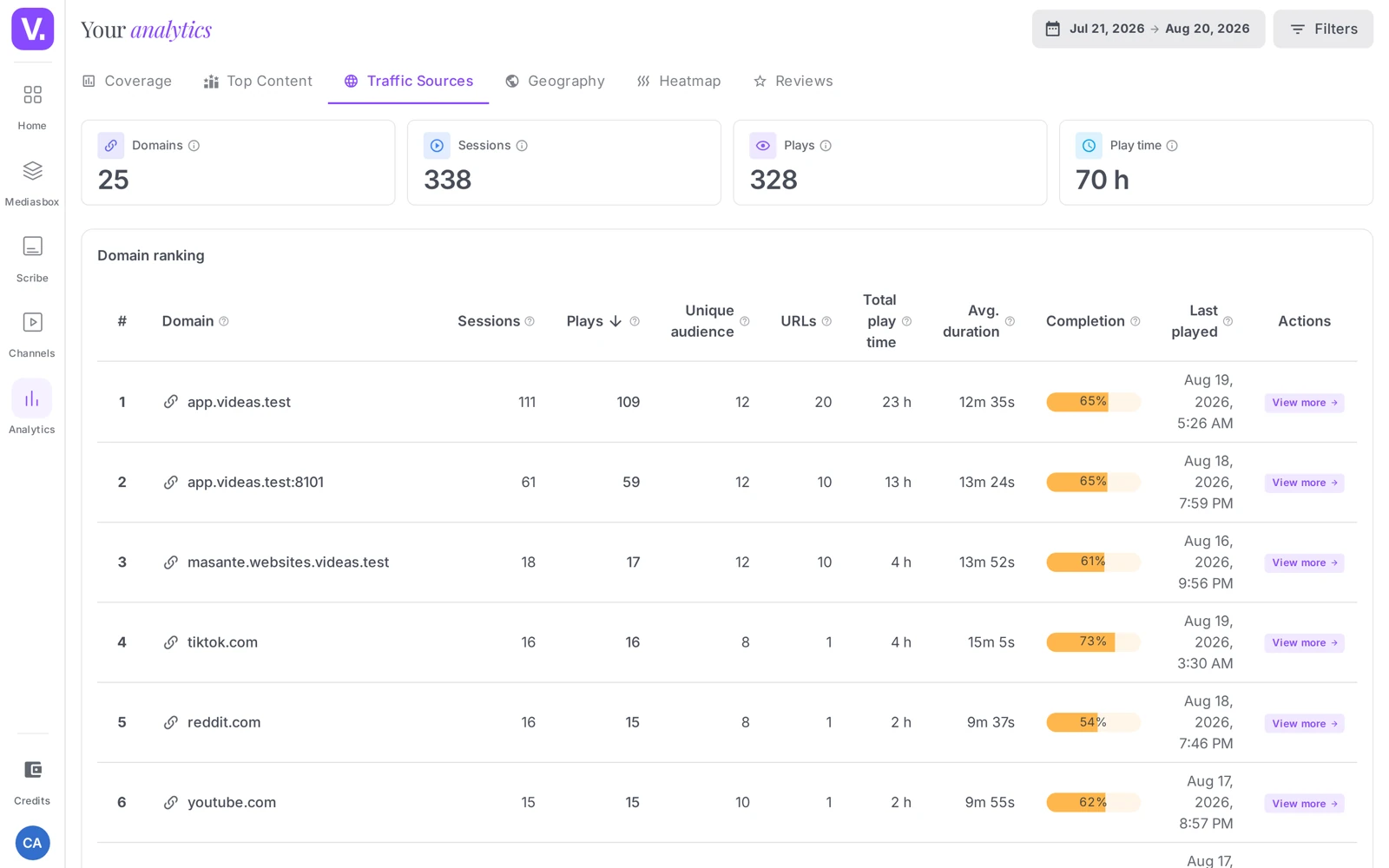
Drilling down: domain → URLs → media
The view has three levels:
- Domains — the list above, the macro view.
- URLs of a domain — click a domain to see the exact pages on that site where your videos are played.
- Media of a URL — open a URL to see which of your media are watched there.
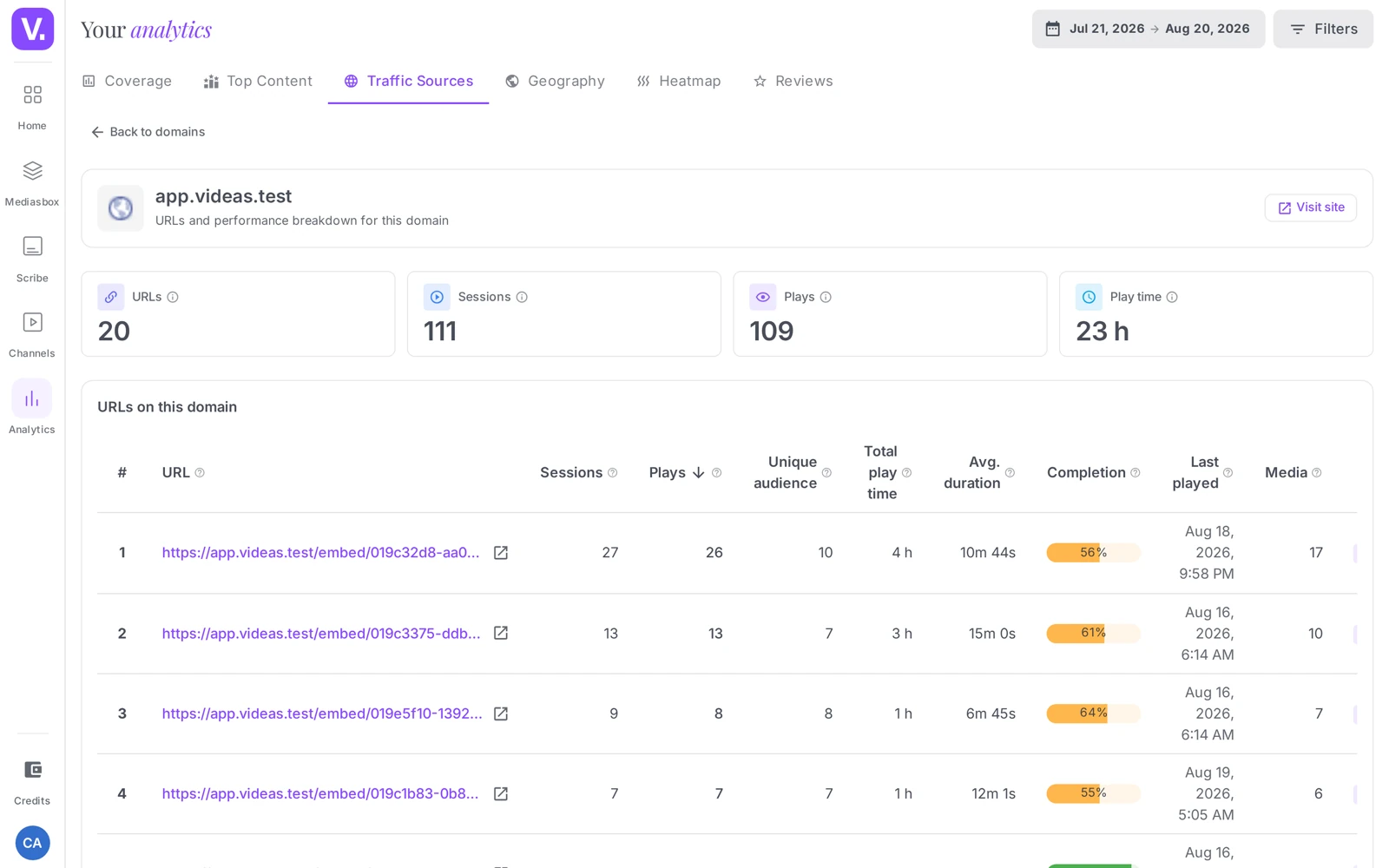
That drill-down is what makes the view actionable: you do not only see “exemple.com brings me 300 plays”, but “the /blog/mon-article page accounts for 250 of them, on video X”.
What it is for
- Identifying your distribution partners: a site that regularly embeds your videos is an audience relay. Spot it, contact it, offer it more content to embed — this is free, lasting acquisition.
- Measuring the effect of an embed: after placing a video on a partner page, check here how many plays it actually generates.
- Comparing site quality: at comparable volume, a domain with a high completion rate serves your videos to a more qualified audience than a domain where people drop off quickly.
Why don’t my direct plays appear here?
Because this tab is focused on external domains: third-party sites that display your videos or link to them. Plays from the Videas application or from a share link are not external sources and do not show up.
The purpose is to measure your distribution outside Videas, not your internal traffic. For totals across all channels, the Coverage tab is the one to open.
How do I find out which exact page my video is watched on?
By working down the view’s three levels. Click a domain to see the URLs — the specific pages on that site where your videos are played — then open a URL to see which of your media are watched there.
That drill-down is what makes the view actionable: you do not just read “example.com brings me 300 plays”, but “the /blog/my-article page concentrates 250 of them, on video X”.
Why compare completion rates between domains?
To tell a relay that brings you volume from one that brings you qualified audience. At comparable play counts, a domain with high completion is showing your videos to people who actually watch them; a domain where viewers drop off quickly inflates your figures without adding anything.
That is the criterion to favour when deciding which partner to deepen the relationship with.
How do I spot a distribution partner?
Look, in the domains table, for sites that come back with steady volume. A site that embeds your videos regularly is a free and durable audience relay: identify it, get in touch, offer it more content to embed.
It is also the most direct way to measure the effect of an embed you have just placed: come back here a few days later, and the partner domain will tell you what it actually generated.
In short
- The Traffic sources tab lists the external sites (domains) where your videos are watched — above all the sites that embed them
- Internal plays (Videas app, share links) are not included
- 4 metrics: Domains, Sessions, Plays, Watch time
- Drill-down over 3 levels: domain → URLs → media
- Ideal for spotting your distribution relays and measuring the effect of your embeds
Related articles
Screenshots were taken on Videas Academy, an example channel built for this help center. It belongs to a fictional customer, not to Videas: your own channel carries your name, your branding and your prices.