Optimize the SEO of your content
In Videas, your channel’s search ranking is configured in several places depending on the type of content: every page and every blog post has a Meta title and Meta description field; media shares generate their metadata automatically from the media’s name and description; and the AI Assistant can suggest SEO keywords. This guide covers each lever in turn.
It separates what you configure by hand from what is automatic, so you know where to act to gain visibility.
SEO for channel pages
Every page on your channel has its own SEO fields, in the page settings of the editor.
- Open the channel editor and the page manager (the Page: … selector).
- Open the settings of the page you want to optimize.
- In the SEO section, fill in:
- Meta title — the title shown in search results and in the browser tab. Left empty, Videas uses the page title.
- Meta description — the description below the title in the results. Left empty, the page excerpt is used.
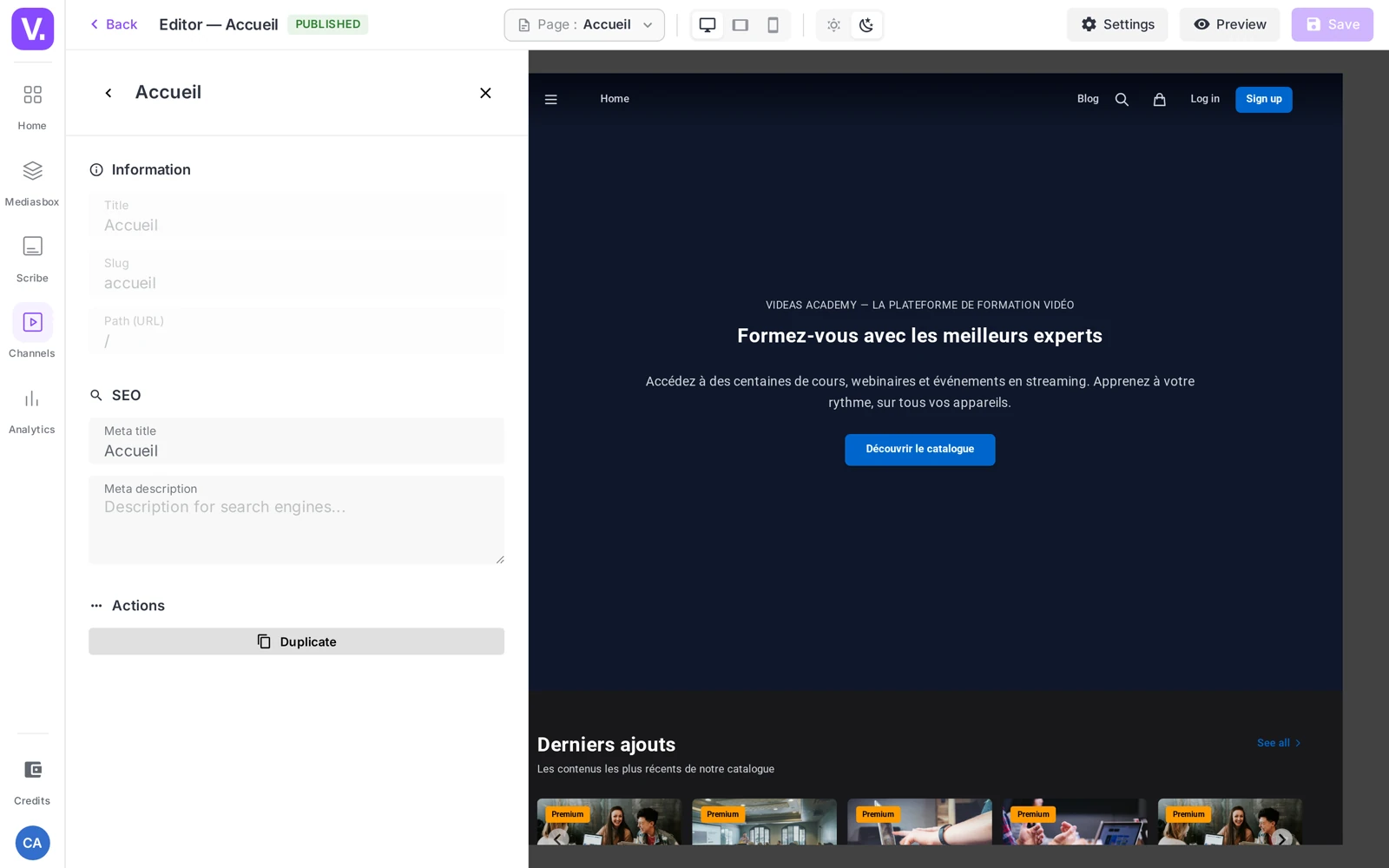
Remember: these fields exist to separate what your visitors see from what Google displays. Useful if your editorial title is short and creative (“The Replay”) but you want a more descriptive meta title (“Replay library — Brand X”).
SEO for blog posts
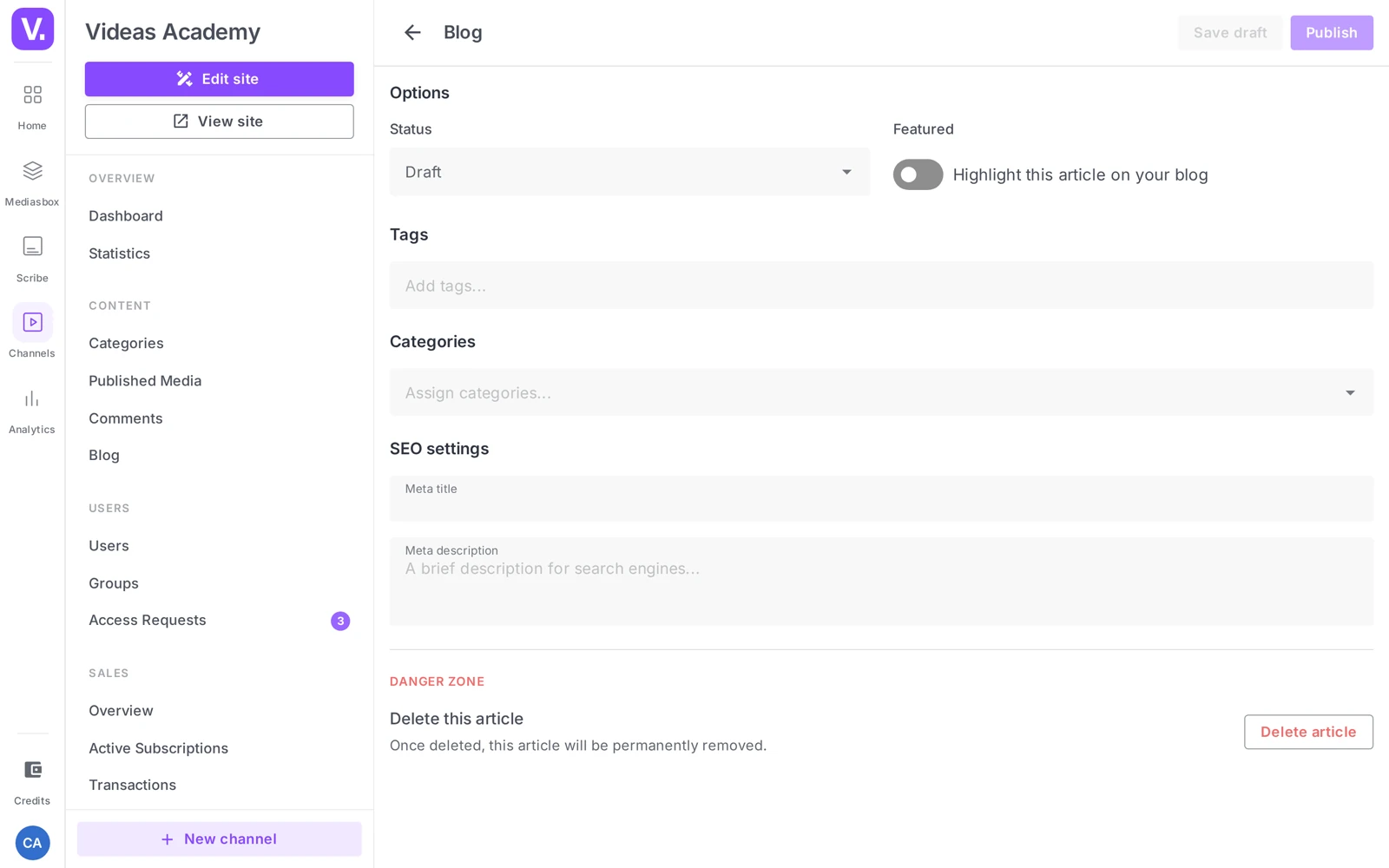
If your channel has a blog, every post has its own SEO fields too.
- In your channel, open Blog and create or edit a post.
- At the bottom of the form, in the SEO settings section, fill in:
- Meta title — by default, the post title (visible as a placeholder). Override it for a better-optimized title.
- Meta description — by default, the post excerpt, otherwise the beginning of the content.
The post’s cover image doubles as the social share image (1200 × 630 px recommended). Take care with it: it has to stay legible as a thumbnail.
Automatic SEO for media shares
Unlike pages and posts, media themselves (videos, audio, images, documents) have no dedicated Meta title / Meta description field. When a media item is shared or published, Videas automatically derives its share metadata (Open Graph, for the preview on social media) from its main information:
| Source field on the media | SEO role when shared |
|---|---|
| Name | Title of the page / preview |
| Description | Description of the preview |
| Main thumbnail | Preview image (social media) |
The upshot: to make a media item findable, take care of its name and its description. See Edit a media item’s information, which covers this mechanism in detail.
Suggest keywords with AI
On a media item’s page (the Overview tab), the AI Assistant panel offers Generate SEO keywords — the AI analyzes the transcript, the title and the description and suggests a list of keywords, added to the media as tags. The same panel also offers Write titles and descriptions.
Important: tags are not indexed as keywords by Google (the
<meta name="keywords">tag is ignored). Their value lies elsewhere: filtering your media library, catalog pages by theme, and inspiration for your descriptions (which really do count).
Best practices
- Lengths: Meta title 50-60 characters, Meta description 150-160 (beyond that, Google truncates). A descriptive media name, 5-8 words.
- Main keyword at the start of the meta title; the meta description extends the title instead of repeating it.
- Share image: 1200 × 630 ratio, content legible when small, little embedded text.
- Consistency: keep a uniform meta title structure across the whole channel (“Page title — Brand X”).
Where do I set a video’s SEO?
Nowhere directly: media items have no dedicated Meta title or Meta description field, unlike pages and blog articles.
Videas automatically derives their sharing metadata from their main information: the Name becomes the title, the Description the description, and the main thumbnail the preview image on social networks. So to rank a media item, it is its name and description you have to look after.
Do tags help with search ranking?
No, not in the sense usually meant. The <meta name="keywords"> tag has been ignored by Google for a long time, and a media item’s tags are not indexed as keywords.
Their value lies elsewhere, and it is real: filtering your library, feeding themed catalogue pages, and inspiring your descriptions — which do count. That is the angle from which to read the AI assistant’s keyword suggestions.
Why have a meta title different from the page title?
To separate what your visitors see from what Google shows. Your editorial title can be short and creative — “The Replay” — while the meta title has to be descriptive: “Replay library — Brand X”.
The first lives on your site, where navigation supplies the context. The second lives in a results page, where it has only itself to make sense. Left empty, the meta title simply reuses the page title.
What lengths should I aim for?
50 to 60 characters for the meta title, 150 to 160 for the meta description — beyond that, Google truncates. For a media name, count on 5 to 8 descriptive words.
Two writing rules go with that. The main keyword at the start of the meta title, where it weighs most. And a meta description that extends the title rather than repeating it: the two are shown together, and repeating wastes half the space.
What format should the share image be?
1200 × 630 pixels, with content readable when small and little embedded text. It is the image shown when someone shares your page on LinkedIn or X — often at a size where a title in small type becomes unreadable.
For a blog article, that image is simply the cover image. For a media item, it is its main thumbnail.
Should I harmonise meta titles across the channel?
Yes, a consistent structure such as “Page title — Brand X” helps on two counts. It makes your results recognisable in a search page, and it saves you inventing a format for every page.
It is a detail that costs little and shows: a channel whose titles all follow the same logic looks better kept than one where every page invented its own.
In summary
- Channel pages: Meta title / Meta description fields in the page settings (SEO section) of the editor.
- Blog posts: an SEO settings section with Meta title / Meta description; the cover image doubles as the share image.
- Media shares: metadata auto-derived from the Name, the Description and the thumbnail — no dedicated SEO field.
- The AI Assistant suggests SEO keywords applied as tags (useful for internal classification, not indexed as keywords).
- Count on 50-60 characters for the meta title and 150-160 for the meta description.
Related articles
Screenshots were taken on Videas Academy, an example channel built for this help center. It belongs to a fictional customer, not to Videas: your own channel carries your name, your branding and your prices.