Delete your account, an organization or a workspace
Three levels of deletion, not to be confused: you delete your own user account from Settings → Personal Settings (with double confirmation), a workspace from its own settings (General → Danger zone → Delete workspace), while an entire organization can only be deleted on request from support. This guide covers all three.
Delete your user account
You delete your account yourself, from Settings → My Profile → Personal Settings: at the very bottom of the page, the Danger Zone (“Irreversible and destructive actions”) carries the Delete my account button. The flow deliberately has three steps to prevent mistakes:
- Warning — a summary of what deletion entails (loss of access, immediate revocation of your API tokens, erasure of your data).
- Feedback — a reason for leaving (optional) to help us improve.
- Confirm — you receive a 6-digit code by email to enter, and you must type the phrase DELETE MY ACCOUNT to confirm.
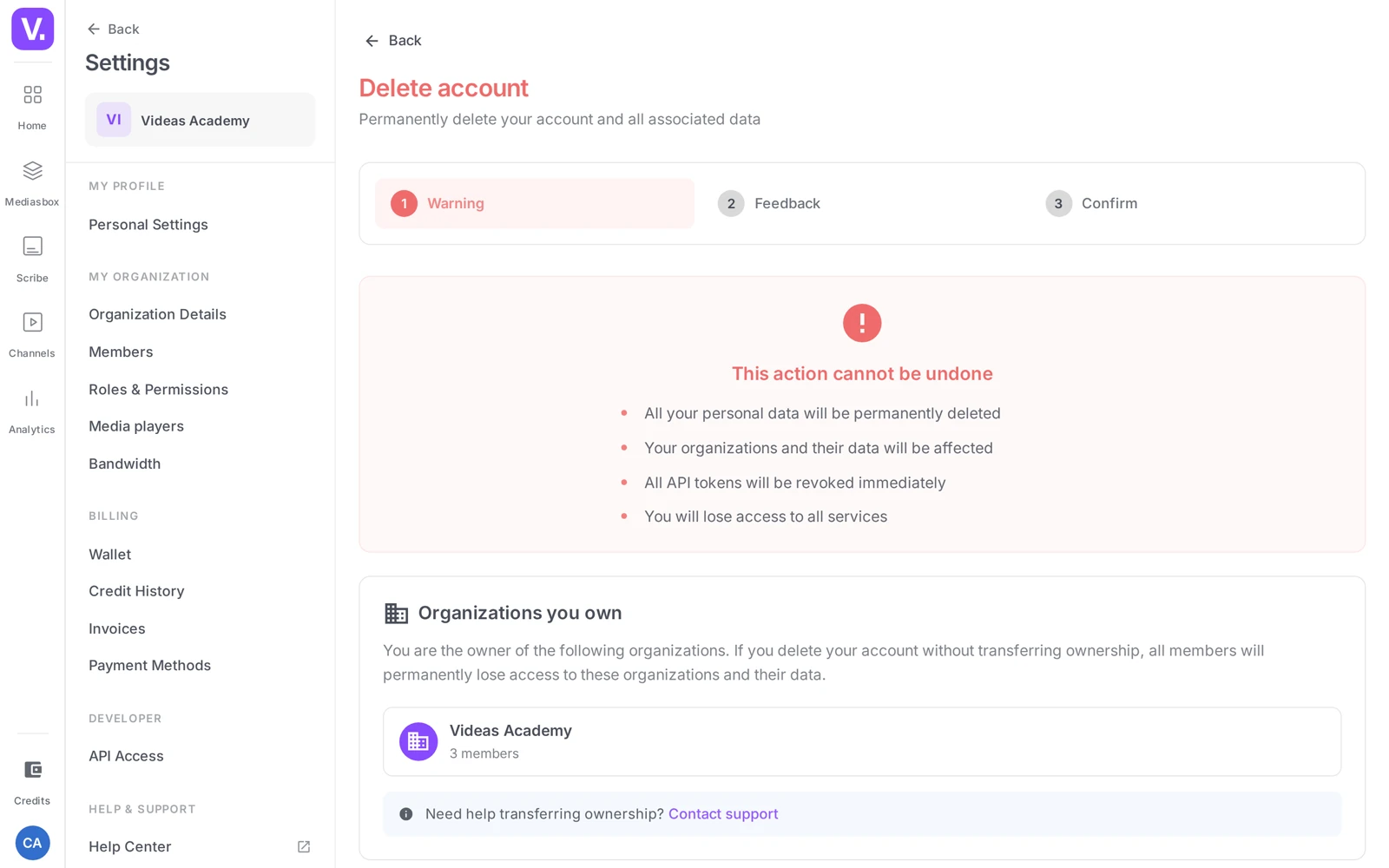
Blocker — you own an organization with other members: deletion is refused as long as you are the Owner of an organization that has other members. Videas then prompts you to transfer ownership (or remove the members) first. Ownership transfer goes through support. An organization where you are the only member does not block deletion.
Delete an organization
Deleting an entire organization (with its workspaces, its media, its members) is not self-service — it is a sensitive and irreversible operation. Contact support: the team handles it for you, after verification.
Delete a workspace
A workspace, on the other hand, is deleted directly from its settings: Workspace settings → General, the Danger zone section. The row is called Delete workspace (“Permanently delete this workspace and all its contents.”) and the button simply reads Delete. You need the Delete workspace permission (typically Admin or organization Owner).
Good to know: before the final purge, media deleted from a workspace stay for a while in the workspace’s Deletion history, where you can restore them. See Configure a workspace’s settings.
Can I delete an organization myself?
No. Deleting a whole organization — with its workspaces, its media and its members — is not self-service: it is a sensitive, irreversible operation, handled by support after verification.
Two of the three levels, however, are done without us: your user account, from your personal settings, and a workspace, from its own settings.
Why is my account deletion refused?
Because you are the Owner of an organization that has other members. Videas blocks the operation to avoid leaving an organization with no owner and its members with no access.
The way out is a transfer of ownership, which support performs for you, or removing the other members first. Note that an organization where you are the only member does not block deletion.
How does account deletion work?
In three steps, deliberately. A warning sums up what deletion entails — loss of access, immediate revocation of your API tokens, erasure of your data. A comments screen asks for a reason for leaving, optional. Then confirmation: a six-digit code received by email to enter, and the phrase DELETE MY ACCOUNT to type out.
All of it sits in Settings → My profile → Personal settings, in the Danger zone at the very bottom of the page.
What happens to my API tokens after account deletion?
They are revoked immediately. Since tokens are attached to your user account and not to the organization, they disappear with it.
Plan for that if integrations are running in production under your name: they will stop working without notice. Good practice is to have those tokens recreated by whoever takes over the integration before you leave.
Can media deleted along with a workspace be recovered?
Not once the workspace is deleted — that operation is permanent, and the interface accordingly requires you to type the workspace’s exact name to confirm.
While the workspace exists, however, deleted media stay for a time in its Deletion history, from which they are restored in one click. The reflex before deleting a workspace: go through Data → Export to recover the metadata, and download the source files you want to keep.
In short
- User account: self-service (Personal Settings → Danger Zone → Delete my account), with an email code + the phrase DELETE MY ACCOUNT to retype
- Account deletion is refused if you own an organization with several members — transfer ownership first (through support)
- Entire organization: on request from support, not self-service
- Workspace: self-service in General → Danger zone → Delete workspace (Delete button, Delete workspace permission)
Related articles
Screenshots were taken on Videas Academy, an example channel built for this help center. It belongs to a fictional customer, not to Videas: your own channel carries your name, your branding and your prices.