How to share a video privately
To share a video privately in Videas, you create a share link, then restrict it: a password, an expiry date, and if needed a limited number of views. The video is never public — it appears on no open page, is not indexed by search engines, and is only reachable by the people you send the link to.
That is the difference with an “unlisted” video on YouTube: on Videas, a private video is genuinely closed, not merely hidden. And it is hosted in Europe, with no transfer of your data outside the EU.
What “private” means in Videas
Three levels not to be confused:
| Level | Who can watch | Indexed by Google? |
|---|---|---|
| Public (channel, page) | Everyone | Yes, potentially |
| Unlisted (other platforms) | Anyone with the link | Sometimes, if the link leaks |
| Videas private (restricted share link) | Only people holding the link, under your rules | No, never |
A Videas share link points to a dedicated page (app.videas.com/share/…) that is not connected to any public navigation and that indexing robots do not crawl. Add a password and an expiry date, and you get a genuinely confidential share.
Making a video private, step by step
1. Create the share link
Open the video in your workspace and click Share — the link is created automatically. The full procedure is covered in How to share a video with a link; this article focuses on the settings that make a share confidential.
By default, a freshly created link is already restricted on one point: it expires in 7 days. But it has no password yet. For genuinely sensitive content, add the protections below.
No account yet? The free Send a large video tool creates a share link straight from a file drop, with no sign-up. Create an account afterwards and your shares follow you.
2. Add a password
Turn on the Password protection toggle and enter a password. The recipient will have to type it in before reaching the player.
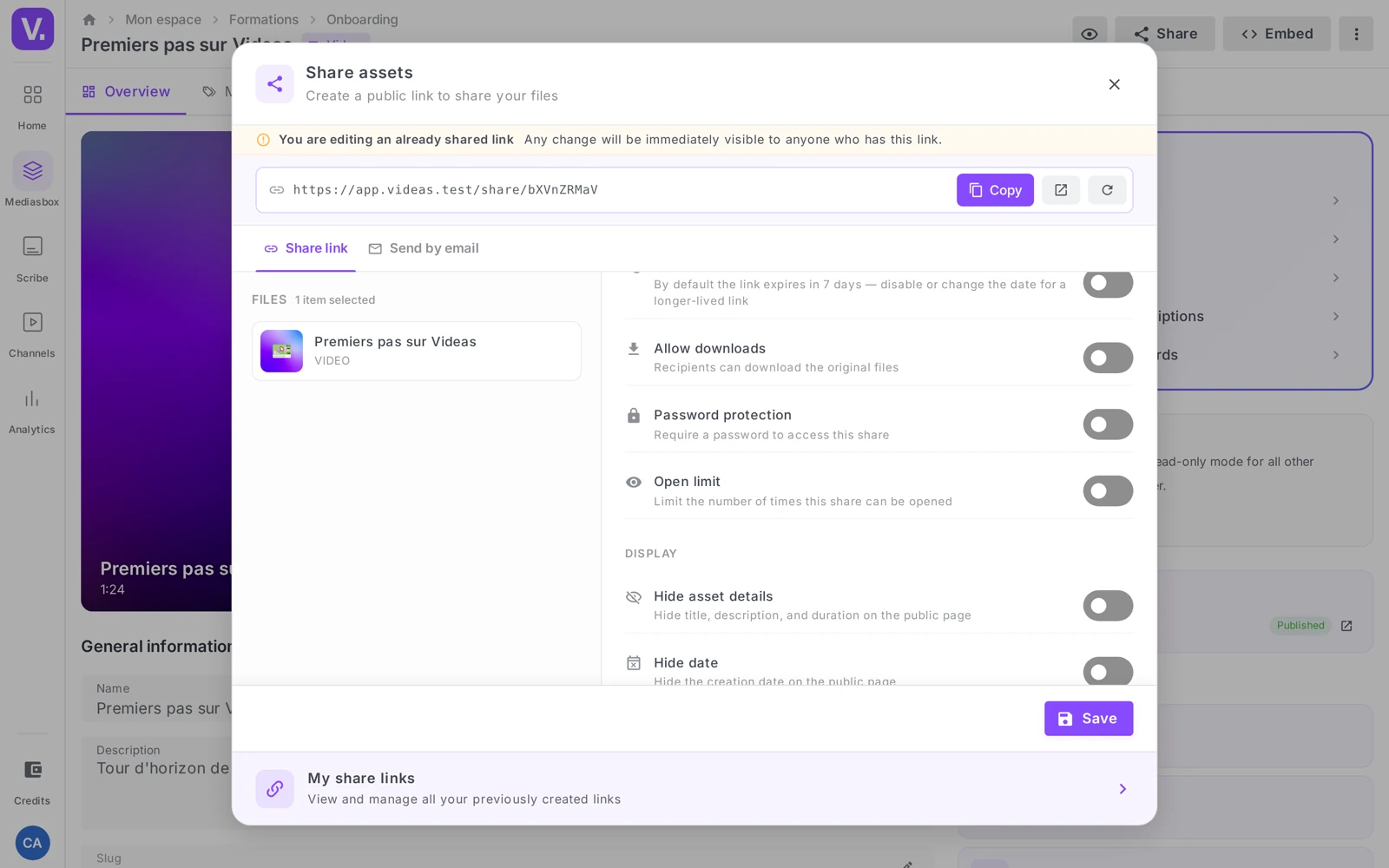
Two rules to make this protection worth anything:
- Choose a strong password. Videas enforces no length requirement — so it is up to you not to use
1234. A passphrase (replay-webinar-march-2026) is both robust and easy to pass on. - Send it through a different channel than the link. A password written in the same email as the URL it protects protects nothing. Link by email, password by message, or the other way around.
For the detailed procedure, see Protect a video with a password.
3. Set a short expiry
Leave the Expiry toggle on and bring the date closer. For confidential content, a short expiry (a few days) narrows the window during which a forgotten or forwarded link can be opened.
A confidential link with no end date is the worst case: it stays open indefinitely, and you will end up forgetting about it.
4. Limit the number of opens
Turn on Open limit and set a number. Once it is reached, the link deactivates itself. For a one-to-one send — a product proof to a client, a clip to a jury — a low limit (3 to 5) makes sure the link will not be used beyond its intended purpose.
Careful: the counter tracks opens, not people. The same recipient reloading the page three times uses up three opens.
5. Hide the media details
Turn on Hide details to remove the title, description and duration from the share page. Useful when the internal file name gives away context the recipient has no business knowing (buyout-negotiation-v2.mp4).
Why host your private videos on Videas
For confidential content, where the video is stored matters as much as the link:
- Hosted in the EU — no transfer outside Europe, a dedicated DPO, native GDPR compliance. For an internal, HR, medical or strategic video, that is a decisive criterion.
- No public indexing — your private videos never surface in a search engine and never feed a recommendation algorithm.
- No advertising, no third-party tracking — the content is not mined to target your viewers.
That is what sets a private video on Videas apart from a “hidden” video on a consumer platform, where the content stays hosted outside Europe and potentially analysed. On Vimeo, for instance, the player sets third-party cookies even on a restricted video — see the Videas vs Vimeo comparison.
The infrastructure behind it — multi-quality encoding, storage, playback restricted to the domains you allow — is described on the Video hosting page.
What private sharing does not protect
Worth knowing, so you do not believe yourself better protected than you are:
- It does not verify the visitor’s identity. Anyone holding the link — and the password if there is one — can open the video. There is no restriction by email domain. To track who gets access, use the per-recipient email send described in How to share a video with a link.
- It does not prevent re-sharing. No watermark, no screen-recording block. A determined recipient can forward the link or film their screen.
For high-stakes content, real robustness comes from the combination: strong password + short expiry + limited number of opens + link sent over a private channel.
Frequently asked questions
Can a Videas private video show up in Google?
No. The share page is not indexed by search engines. Only the people you send the link to can reach it.
Does the recipient need to create an account?
No. They open the link in their browser, type the password if you set one, and watch the video. No account required.
How do I cut off access to a video I have already shared?
Reopen Share on the video and switch off the Active toggle, or delete the share from the My share links page. The link then stops working.
Can I make a video private after publishing it on a channel?
Private link sharing is independent of channels. A video delivered publicly on a channel stays public as long as it is listed there; the private link is for targeted sharing, alongside or instead of public delivery.
Are “unlisted” and “private” the same thing?
No, and the nuance matters. An unlisted video on a mainstream platform is simply hidden: it stays reachable by anyone who gets the link, and it sometimes ends up indexed if that link is published somewhere.
A Videas share link points to a dedicated page (app.videas.com/share/…) that is connected to no public navigation and that indexing robots do not crawl. Add a password and an expiry date, and the share is no longer merely hidden: it is closed.
Where are my private videos hosted?
In the European Union — with no transfer outside Europe. For an internal, HR, medical or strategic video, that is often the deciding criterion.
Two more points separate Videas from a mainstream platform: your private videos feed no recommendation algorithm and carry no advertising or third-party tracking.
Which settings should I combine for genuinely sensitive content?
All four, together: a strong password, a short expiry (a few days), a low open limit (3 to 5 for a named send), and the link sent over a private channel, separate from the one carrying the password.
It is the combination that protects, not any single setting. A password with no expiry leaves a door open indefinitely; an expiry with no password lets in anyone who gets hold of the URL before the date.
What should I hide on the share page?
The title, the description and the duration, through the Hide details option — as soon as your internal naming gives away context the recipient has no business knowing. A file called acquisition-talks-v2.mp4 says too much before the video even starts.
The option is cosmetic and replaces no access protection, but it prevents an information leak through the file name — the kind of detail you only notice afterwards.
Does a private link stop the recipient from re-sharing the video?
No. There is no watermark and no screen-recording block, and a determined recipient can forward the link, pass on the password or film their screen. Private sharing controls access, not what is done with it afterwards.
Two practical countermeasures: cap the number of openings so a forwarded link runs out quickly, and for very high-stakes content, burn a confidentiality notice into the picture before upload — a deterrent, not a technical protection.
In short
- A Videas private video = a restricted share link: password, expiry, limited opens
- The share page is never indexed by search engines
- Your content is hosted in Europe, with no transfer outside the EU (GDPR)
- Private sharing controls access, not identity or re-sharing — combine protections for sensitive content
- No account required on the recipient’s side
Going further: a private link takes seconds to create from your Videas workspace. With no account, the Send a large video tool handles the upload and returns the link straight away; to host a private library for the long run, see Video hosting. Everything Videas offers to protect a video — link, password, per-recipient tracking, members-only channel — is gathered on the Private video sharing page.
Related articles
Screenshots were taken on Videas Academy, an example channel built for this help center. It belongs to a fictional customer, not to Videas: your own channel carries your name, your branding and your prices.