Quality & streaming
HLS adaptive bitrate, quality selector, and Eco mode.
Preview
Props & interactive options
| Prop | Type | Default | Description | Try it |
|---|---|---|---|---|
| show_eco_mode | url param | 0 | Show Eco mode shortcut button. | |
| show_info_button | url param | 0 | Show info button. |
Try it in the player
Quality selector
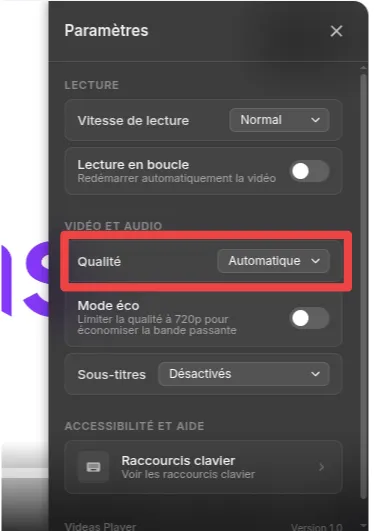
Click the gear icon in the control bar, then choose a resolution: Auto, 360p, 480p, 720p, or 1080p.
Eco mode
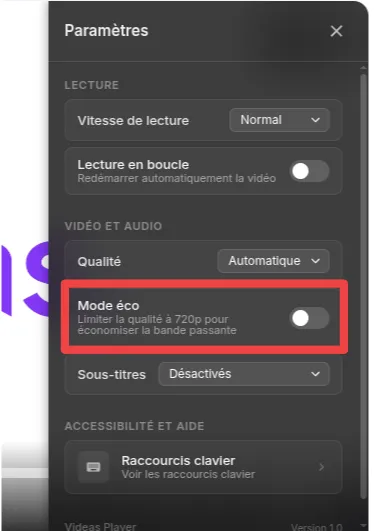
When enabled, the player caps quality at 720p to save bandwidth. Toggle it in the settings panel or via the embed parameter.
Adaptive bitrate
In Auto mode, the player monitors your connection and seamlessly switches between quality levels without interrupting playback.
Documentation
The video is streamed via HLS (HTTP Live Streaming) with adaptive bitrate. The player automatically adjusts the quality based on the viewer's connection speed. Available quality levels depend on the source encoding and typically include 360p, 480p, 720p, and 1080p. To change the quality manually, open the settings panel (gear icon in the control bar) and select a level. The "Auto" option lets the player choose the best quality dynamically. Eco mode caps the maximum resolution at 720p to reduce bandwidth usage and energy consumption. Use the toggles above to show or hide the Eco mode shortcut and the info button, both displayed in the top-right corner of the player.

Code
<div style="padding:56.25% 0 0 0;position:relative;">
  <iframe
    src="https://app.videas.com/embed/019dcf5b-0c22-731c-8e3c-d24264812bd5/?show_chapters=0&show_eco_mode=0&show_info_button=0"
    width="100%" height="100%"
    frameborder="0" allowfullscreen
    allow="autoplay; fullscreen; picture-in-picture"
    style="position:absolute;top:0;left:0"
  ></iframe>
</div>
Frequently asked questions
How does the player decide which quality to start with?
By default it starts in Auto mode: the HLS engine measures the viewer's bandwidth during the first few seconds and picks the highest rendition it can stream without buffering, then keeps adapting in real time. Viewers can still override the choice from the settings panel.
Which resolutions are available?
Available levels depend on the source encoding — typically 360p, 480p, 720p and 1080p. Higher resolutions are generated automatically when the original file is high enough; Videas never upscales.
What is Eco mode and when should I enable it?
Eco mode caps the maximum rendition at 720p, which cuts bandwidth and energy usage by roughly 2–3x compared to 1080p. It is useful for intranets, mobile-first audiences, and as an opt-in shortcut for environmentally-conscious viewers.